TikTok Font Generator
Our free tiktok font generator turns plain text into bold, cursive, monospace, circled, and aesthetic Unicode styles for your TikTok bio, video captions, comments, and on-screen text overlays. Copy and paste instantly — no app install, no signup.
What is a TikTok Font Generator?
A tiktok font generator is a copy-and-paste text styler that uses Unicode characters (not a separate font file) so your words look bold, italic, script, or decorative inside TikTok — where built-in formatting is limited. Creators use it for bios, hooks in captions, pinned comments, and text overlays that match a trending aesthetic.
People also search for a tiktok stylish text generator or tiktok aesthetic fonts when they want the same "custom font" look without design apps. If you need a scarier vibe for edits, pair this page with our Glitch Text Generator — and for Instagram cross-posting, try Instagram Fonts. Saving clips for reposts? Use our TikTok Video Downloader.
Why Use Custom Fonts on TikTok?
Boost Visibility
Stand out in the For You Page with eye-catching text that stops the scroll.
Increase Engagement
Unique fonts make your content more memorable and shareable.
Build Your Brand
Create a consistent visual identity that makes you recognizable.
Fully Compatible
Works in TikTok bio, captions, comments, and text overlays.
Mobile Optimized
Perfect for the TikTok mobile app. Copy and paste with ease.
Free to Use
No subscription needed. Generate unlimited TikTok fonts for free.
How to Use Fonts on TikTok
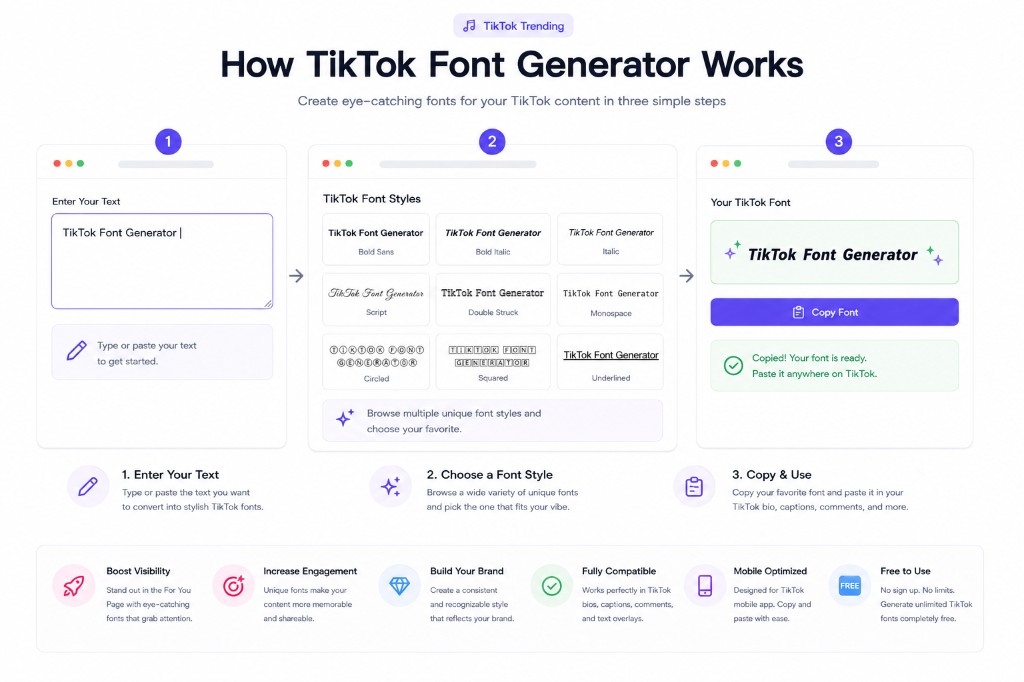
TikTok's default text options are limited, but with Unicode styles from a tiktok font generator, you can make your profile and content stand out from millions of other creators. Custom fonts help you build a recognizable brand and catch viewers' attention in the crowded For You Page.
Viral Caption Strategies
The TikTok algorithm favors content that keeps users watching and reading. Using unusual fonts in your captions stops the scroll pattern. When a user pauses to read a bold or script caption, that extra second of watch time signals engagement to the algorithm.
Beyond Basic Text
These fonts work in your TikTok bio, video captions, comments, and even in text overlays (when you copy-paste them). They're especially popular among content creators who want to establish a unique visual identity and make their profile more memorable.
Pro tip: Use bold fonts for CTAs like "Follow for more" or "Link in bio". Use script fonts for your name or brand. Use circled fonts for bullet points or lists. Mixing fonts strategically can significantly improve your profile's visual appeal.
If you create horror or "cursed" content, try our Glitch Text Generator for a scary effect. For cross-posting to other platforms, check out our Instagram Fonts tool.
TikTok Font Ideas
Creator Bio
Make your TikTok bio stand out with bold, attention-grabbing fonts.
Video Captions
Use stylish fonts in captions to make your videos more engaging.
Call to Action
Emphasize CTAs with bold fonts to drive more follows and engagement.
Brand Name
Make your brand or business name memorable with unique fonts.
Challenge Participation
Stand out in trending challenges with stylish text.
Tutorial Titles
Make tutorial videos more professional with clean fonts.
Frequently Asked Questions
Is this a TikTok font generator copy and paste tool?▼
Yes. Everything here is standard Unicode you can copy and paste into TikTok bios, captions, comments, and many overlays. If you want a similar workflow for Instagram, try our Instagram Fonts tool too.
Can I use these fonts in my TikTok username?▼
TikTok has restrictions on special characters in usernames. However, you can use these fonts in your display name (the name shown on your profile), bio, captions, and comments.
Will custom fonts work in TikTok video captions?▼
Yes! These fonts work perfectly in TikTok video captions. Just copy the styled text and paste it when adding a caption to your video. It's a great way to make your content stand out.
Do TikTok fonts work on mobile?▼
Absolutely. These fonts work on the TikTok mobile app for both iOS and Android. Just copy from our generator and paste directly into the TikTok app.
Which font style is best for TikTok?▼
Bold Sans and Bold Italic are most popular on TikTok because they're eye-catching and easy to read. Script fonts work well for aesthetic content. Circled fonts are great for lists and bullet points. Try different styles to see what fits your brand!
Can I use fancy fonts in TikTok comments?▼
Yes! Using stylish fonts in comments can help your comments stand out and get more likes. It's especially useful for creators who want to engage more with their community.
Will using custom fonts help me get more views?▼
While fonts alone won't guarantee views, they can make your profile and content more memorable, which can lead to more follows and engagement. A professional-looking profile with custom fonts shows attention to detail.
Can I use these fonts for TikTok business accounts?▼
Yes! Many TikTok business accounts use custom fonts to make their brand stand out. Bold and clean fonts like Bold Sans or Monospace work particularly well for business profiles.
Are these fonts safe to use on TikTok?▼
Yes, these are standard Unicode characters that TikTok fully supports. Using them won't violate any TikTok policies or harm your account. Many popular creators use these fonts regularly.
Related Tools
Explore more free tools to boost your productivity
Facebook Fonts Generator
Stylish Unicode fonts for Facebook posts and profile names
Twitter Font Generator
Unique Unicode fonts with character counters for tweets
Fancy Text Generator
45+ Unicode font styles for Instagram, TikTok & Discord bios
Aesthetic Text Generator
Vaporwave and aesthetic fullwidth text for social media
Emoji Text Generator
Add emojis between letters and around text for social media posts
Instagram Fonts Generator
Copy-paste Unicode fonts for Instagram bio and captions