Font Generator - Fancy Text with 45+ Unicode Styles
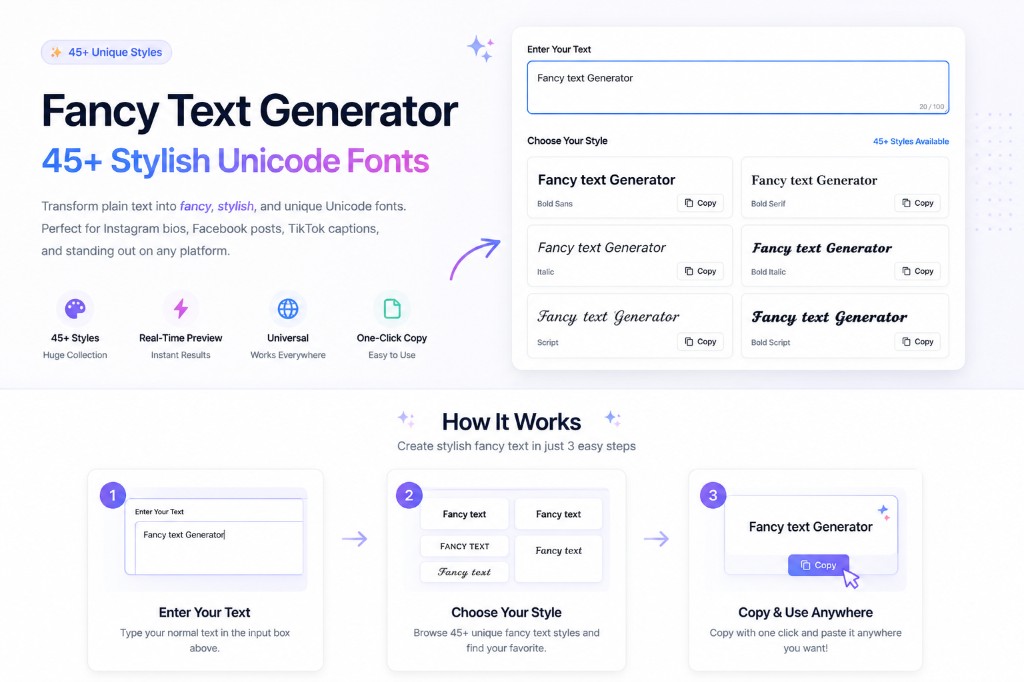
This free font generator transforms plain text into 𝒻𝒶𝓃𝒸𝓎, 𝔰𝔱𝔶𝔩𝔦𝔰𝔥, and ⓓⓔⓒⓞⓡⓐⓣⓘⓥⓔ Unicode fonts. Perfect for Instagram bios, Facebook posts, TikTok captions, and standing out on any platform.
Why Choose Our Fancy Text Generator?
45+ Unique Styles
From elegant scripts to bold gothic fonts, bubble text, vaporwave, and decorative borders - the largest collection of fancy text styles.
Real-Time Preview
See all fancy text variations instantly as you type. No waiting, no page reloads.
Universal Compatibility
Works on all social media platforms, messaging apps, and websites that support Unicode.
One-Click Copy
Copy any style with a single click and paste it anywhere you want.
Totally Free
No registration, no limits, no hidden costs. Generate unlimited fancy text for free.
Privacy Protected
All text processing happens in your browser. Your text never leaves your device.
Fancy Text Generator — Copy and Paste Guide
Our fancy text generator is a free online tool — no download, no sign-up, no installation needed. Every style you create can be copied with one click and pasted anywhere that accepts text. Here's how to use it across the most popular platforms and use cases.
Fancy Text Generator for Instagram
Instagram is the most popular destination for fancy text. Use our fancy text generator for Instagram to create aesthetic bios, standout captions, story text overlays, and highlight titles. Script and bold italic styles are the most used on Instagram — they're elegant, readable, and visually distinctive. Simply generate your preferred style, copy it, and paste it directly into the Instagram bio editor or caption box on your phone or browser.
Fancy Text Generator Copy and Paste
Every style in this fancy text generator is designed for instant copy and paste use. Click any font card to copy it automatically to your clipboard. You can then paste it into Instagram, Facebook, Twitter/X, Discord, WhatsApp, TikTok, YouTube, Telegram, or any other platform that supports Unicode text — which is essentially every modern platform. No formatting is lost when you paste: the decorative characters travel with the text exactly as they appear in the preview.
Fancy Text Generator with Emoji
Want to combine fancy text with emoji? Our generator outputs plain Unicode text, which pairs perfectly with emoji. After copying your fancy text style, simply add emoji in your bio or caption editor before or after the styled text — or between words. For example: ✨ 𝒴𝑜𝓊𝓇 𝒩𝒶𝓂𝑒 ✨ or 𝗬𝗼𝘂𝗿 𝗕𝗿𝗮𝗻𝗱 💼🔥. Emoji and fancy text coexist perfectly because they're all part of the Unicode standard.
Fancy Text Generator for Hindi & Other Languages
Our fancy text generator works primarily with the Latin alphabet (A–Z) since the decorative Unicode characters are based on Latin mathematical symbols. For Hindi and other non-Latin scripts (Devanagari, Arabic, Chinese, etc.), the generator may not produce styled output since Unicode does not have equivalent decorative variants for those scripts yet. However, you can mix Hindi words in regular text with fancy Latin characters for a mixed-style aesthetic effect that still looks unique.
Save Fancy Text as Image (PNG)
Need your fancy text as a PNG image? While our tool generates copy-paste text, you can easily save it as an image by taking a screenshot of the preview, or by pasting the text into a design tool like Canva, Adobe Express, or Google Slides and exporting as PNG. This is useful for platforms that strip Unicode characters (like some gaming usernames) — share the text as an image instead.
What is Fancy Text?
Fancy text uses special Unicode characters to create stylish, decorative fonts that work everywhere. Unlike regular fonts that require special software or CSS files, fancy text is just cleverly chosen Unicode characters that look decorative by design.
Free Font Generator Online
People search for a font generator when they want stylish text without installing fonts. This tool is a Unicode font generator — type once, browse 45+ letter styles, and copy the result to Instagram bios, TikTok captions, Discord, or anywhere Unicode is supported.
Unlike a font-changer app that requires downloading a keyboard extension, this font generator runs entirely in your browser. There's nothing to install, no permissions to grant, and no ads inside the typing box — you type, you get 45+ font generator results instantly, and you copy the one you want. It works the same way on a phone font generator search as it does on desktop.
Looking for a specific type of style? This font generator covers script, gothic, bold, bubble, glitch, cursed, and small-caps fonts in one place — so instead of bookmarking five different single-style tools, one font generator page gives you every style side by side for direct comparison before you copy.
How It Works
Computers use a system called Unicode to display text. While standard keyboards only show about 100 characters (A-Z, 0-9, etc.), Unicode supports over 140,000 characters from all the world's languages, math symbols, and ancient scripts.
Our fancy text generator maps your regular input letters to these obscure mathematical and decorative symbols. For example, when you want a "Script" style, we replace your normal "A" with the Unicode character "𝒜" (Mathematical Script Capital A). To your computer, it's just another text character, which is why you can copy and paste it into Instagram, Discord, or Facebook.
Accessibility Note
While fancy text looks cool, screen readers (used by visually impaired people) often try to read these characters as mathematical symbols. For example, "𝐇𝐞𝐥𝐥𝐨" might be read as "Mathematical Bold Capital H, Mathematical Bold Small E..." which is annoying to listen to. We recommend using these styles for short headlines, names, or decorative elements, but keep your main content in standard text for better accessibility.
Where to Use It
Each style serves different purposes: Script fonts add elegance, Gothic fonts create a vintage feel, Circled text draws attention, and Monospace gives a technical look. Mix and match to find your perfect aesthetic!
Looking for platform-specific fonts?
While our fancy text generator works everywhere, we also have specialized tools optimized for specific social media platforms:
- Check out our Facebook Font Generator for styles that look best on Facebook posts.
- Use the Instagram Fonts tool for bio-optimized aesthetic text.
- Try the TikTok Font Generator for viral caption styles.
Popular Fancy Text Styles
Script (Elegant)
Perfect for wedding invitations, formal announcements, or adding a touch of class to your profile.
Bold Script (Cursive)
Thick, elegant cursive that stands out while maintaining sophistication. Popular for Instagram bios.
Gothic (Vintage)
Great for medieval themes, band names, or creating a mysterious, vintage aesthetic.
Bold Fraktur (Medieval)
Stronger medieval style perfect for gaming usernames, fantasy content, and dramatic announcements.
Negative Circled
Dark bubbles with white text create high contrast. Eye-catching for social media profiles and headers.
Negative Squared
Bold dark squares that command maximum attention. Perfect for important announcements and titles.
Vaporwave (Wide)
Aesthetic fullwidth text popularized by vaporwave culture. Trending on TikTok and Instagram.
Regional Indicator (Flags)
Flag-style letters that create unique visual impact. Great for patriotic or international content.
Double Struck
Mathematical style that looks professional and modern, great for tech-related content.
Parenthesized
Subtle enclosed style that adds sophistication without being too bold. Perfect for subtle branding.
Upside Down
Flipped text creates playful, attention-grabbing content. Popular for fun social media posts.
Stars Border
Decorative star borders add sparkle and draw eyes to important text or announcements.
Frequently Asked Questions
What is the best free font generator online?▼
The best font generator gives you the most styles in one place without downloads, ads inside the input box, or signups. This tool generates 45+ Unicode font styles instantly as you type, so you can compare script, gothic, bold, bubble, and glitch fonts side by side and copy whichever fits your bio, caption, or username.
Is this a free font generator?▼
Yes. This is a free online font generator that uses Unicode characters instead of font files. Type your text, pick a style, and copy-paste — no download or signup required.
How does fancy text work?▼
Fancy text uses Unicode characters that are designed to look decorative. When you type "Hello" and convert it to script, you get "ℋℯ𝓁𝓁ℴ" - these are completely different Unicode characters that naturally look fancy. Since they're just text characters, they work everywhere.
Can I use fancy text on Instagram?▼
Yes! Fancy text works perfectly on Instagram bios, captions, comments, and stories. Many influencers use fancy text to make their profiles stand out. Just copy the style you like and paste it into Instagram.
Will fancy text work on my phone?▼
Absolutely. Fancy text works on all devices - iPhones, Android phones, tablets, and computers. The text will display correctly as long as the device supports Unicode (which virtually all modern devices do).
Which fancy text style is best for Instagram bios?▼
Script and Bold Italic are popular for Instagram bios because they're elegant yet readable. Circled text works well for bullet points. The best style depends on your personal brand and aesthetic - try a few to see what fits!
Can I mix different fancy text styles?▼
Yes! You can mix different styles in the same text. For example, you might use script for your name and circled text for bullet points in your bio. Just generate each part separately and combine them.
Why do some fancy text styles not show up?▼
If you see boxes or question marks instead of fancy text, it means your device or app doesn't support those specific Unicode characters. This is rare on modern devices, but older systems might not display all styles correctly.
Is fancy text good for SEO or accessibility?▼
Fancy text is great for visual appeal but should be used thoughtfully. Screen readers may not read it correctly, so avoid using it for important information that needs to be accessible to everyone. For SEO, regular text in your content is better.
Can I use fancy text in my YouTube channel name?▼
YouTube allows Unicode characters in channel names, so yes! Many creators use fancy text to make their channel names more memorable and visually distinctive. Just make sure it's still readable.
How do I use this fancy text generator for Instagram?▼
Type your text in the input box, choose a style (Script and Bold Italic are most popular for Instagram), click to copy, then open Instagram and paste it into your bio, caption, or story. It works on both the Instagram mobile app and desktop browser.
How do I copy and paste fancy text?▼
Click any font card in the generator — it automatically copies that style to your clipboard. Then paste it (Ctrl+V on desktop, or long-press → Paste on mobile) into any text field on any platform. The decorative characters will appear exactly as they looked in the preview.
Can I use fancy text with emoji?▼
Absolutely! Fancy text and emoji are both Unicode, so they work perfectly together. Generate your fancy text style, copy it, then add emoji directly in your bio or caption editor. For example: ✨ 𝒴𝑜𝓊𝓇 𝒩𝒶𝓂𝑒 ✨ — the emoji and fancy text will coexist seamlessly.
Does the fancy text generator work for Hindi?▼
The generator works with the Latin alphabet (A–Z). Hindi (Devanagari script) does not have Unicode decorative equivalents, so styled output won't be generated for Hindi characters. However, you can mix Hindi words with fancy Latin text for a unique mixed-style effect.
How can I save fancy text as a PNG image?▼
Take a screenshot of the generated text preview, or paste the copied fancy text into a design tool like Canva, Google Slides, or Adobe Express and export it as a PNG. This is useful for platforms that don't support Unicode characters in usernames or specific text fields.
Related Tools
Explore more free tools to boost your productivity
Glitch Text Generator
Create corrupted, glitchy, cyberpunk text effects
Discord Font Generator
17 font styles for Discord messages and server names
Instagram Fonts Generator
Copy-paste Unicode fonts for Instagram bio and captions
Symbol Generator
Browse and copy thousands of Unicode symbols, arrows, and special characters
Emoji Text Generator
Add emojis between letters and around text for social media posts
Bold Text Generator
Make text bold anywhere — Instagram, Twitter, Discord, and more