🎲Virtual Dice

Random Dice Roller

Our random dice roller rolls virtual D4, D6, D8, D10, D12, D20, and D100 dice online — choose how many to roll and see each die plus the total. Perfect for D&D, board games, Yahtzee, and quick decisions when you do not have physical dice.

What is a Random Dice Roller?

A random dice roller simulates rolling physical polyhedral dice in your browser — D6 for board games, D20 for RPG attack rolls, D100 for percentile tables, and more. Each roll uses secure randomness so results are fair for tabletop play, party games, and online sessions.

How to Use the Random Dice Roller
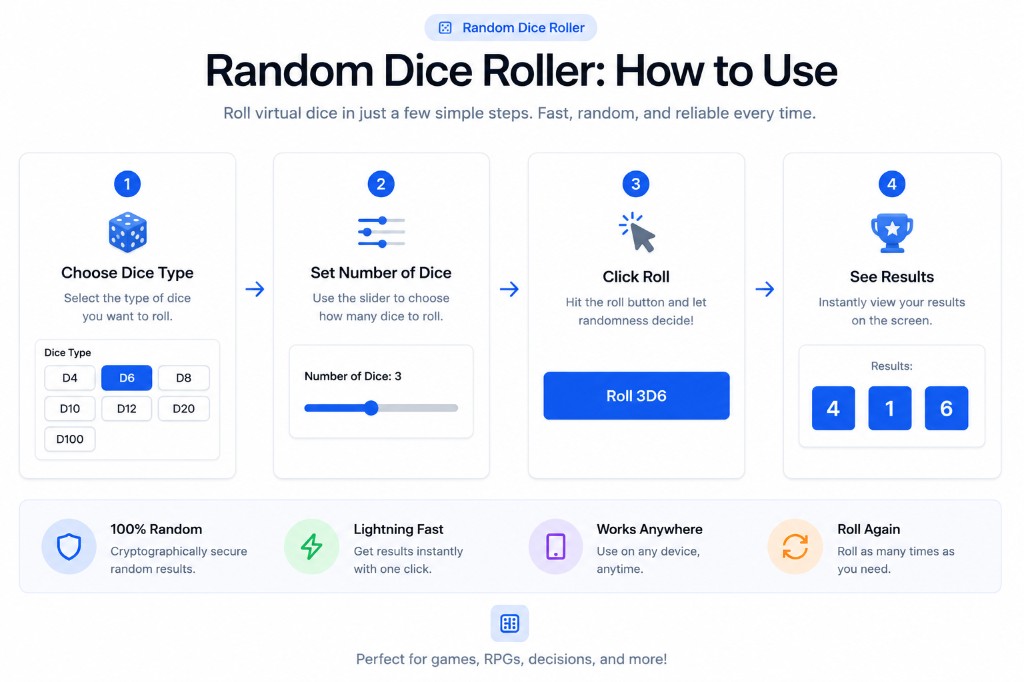
Random Dice Roller — How to choose dice type, set count, roll, and view results
  1. 1Choose your dice type (D4, D6, D8, D10, D12, D20, or D100).
  2. 2Set how many dice to roll with the slider (1–10).
  3. 3Click Roll to animate and reveal each die face plus the total.
  4. 4Roll again anytime — each result is independent and random.

Understanding Dice Types

D4 (Tetrahedron)

Used for low-damage rolls in RPGs like D&D.

D6 (Cube)

The standard die for board games, Yahtzee, and casinos.

D20 (Icosahedron)

The most famous RPG die, used to determine success or failure in checks.

D100 (Percentile)

Used for percentage rolls or loot tables.

Whether you lost your physical dice or just need a quick roll for a decision, our random dice roller uses cryptographic randomness to ensure every roll is fair.

For more general randomness needs, check out our Random Number Generator which lets you set any custom range, or let fate decide with our Random Choice Generator.

Frequently Asked Questions

Is this a free online dice roller for D&D?

Yes. Roll D4, D6, D8, D10, D12, D20, and D100 for Dungeons & Dragons and other RPGs. You can roll multiple dice at once and see the total instantly.

Are virtual dice rolls truly random?

Our random dice roller uses secure browser randomness so each roll is unpredictable and fair — suitable for games, contests, and casual decisions.

Can I roll multiple dice at once?

Yes. Use the slider to roll up to 10 dice of the same type. You will see each individual result and the combined total when rolling more than one die.

Does this work on mobile?

Absolutely. Open the page on iPhone or Android, pick your die type, and tap Roll — no app install required.

About the Dice Roller

The Dice Roller produces unpredictable results for games, giveaways, teaching demonstrations, and decision making. Roll virtual dice — D4, D6, D8, D10, D12, D20, and custom Random values are generated in the browser using modern APIs designed for fair, hard-to-guess output.

Use the Dice Roller for raffles, tabletop games, classroom activities, or breaking ties among friends. You control ranges, counts, and formats so the output matches your scenario. No signup is required and results appear instantly.

BetterUtils runs entirely in your browser whenever possible. Your inputs are processed locally on your device and are not uploaded to our servers, stored in a database, or shared with third parties. That makes our tools a practical choice when you are working with personal text, business data, screenshots, or files you do not want to send across the internet.

Whether you visit the Dice Roller once or use it every week, BetterUtils keeps the experience consistent: clear labels, accessible controls, and copy-friendly output. If you are comparing options online, try this page alongside our other random & fun to see which workflow feels fastest for your team.

Common use cases

  • Giveaways and classroom prize draws
  • Board games and party activities
  • Splitting chores or choosing restaurants
  • Generating sample data for demos

How to use the Dice Roller

  1. 1

    Open the Dice Roller

    Load this page in any modern browser on desktop, tablet, or phone. No account or download is required.

  2. 2

    Enter your input

    Type or paste the text, numbers, URL, file, or values you want to process. Settings appear near the main input when customization is available.

  3. 3

    Adjust options

    Choose styles, units, formats, or advanced settings that match your task. Defaults work well for quick everyday use.

  4. 4

    Generate the result

    Click the primary action button or watch live output update automatically as you edit input.

  5. 5

    Copy, download, or reuse

    Copy output to your clipboard, download files when supported, or explore related tools linked below.

Tips for best results

  • Set realistic min and max bounds for number generators.
  • Use multiple dice or draws when simulating games fairly.
  • Seed-based randomness is not required for casual use cases.
  • Document giveaway rules when running public contests.

Why users choose BetterUtils

BetterUtils focuses on speed, clarity, and privacy. The Dice Roller loads quickly on modern browsers, works without creating an account, and keeps processing on your device whenever the tool supports local execution. That makes it practical for daily workflows whether you are drafting social content, preparing homework, shipping a website, or debugging a project on a deadline.

Unlike cluttered download portals, each utility page explains what the tool does, who it is for, and how to get reliable results. You can bookmark the Dice Roller, return from mobile or desktop, and combine it with other free tools in the same session. Explore the related tools section below for complementary generators and converters that complete common tasks end to end.

This page is part of our Random & Fun collection on BetterUtils. Browse related utilities below or visit the full tools directory to discover calculators, converters, SEO utilities, and creative generators that work in your browser.

Frequently asked questions

Is the Dice Roller truly random?

Browser generators use cryptographic or pseudo-random APIs suitable for games and casual draws.

Can I run giveaways with this tool?

Yes for informal contests, but document rules and eligibility for public promotions.

Is there a limit on range size?

Very large ranges are supported, but extremely big spans are uncommon for everyday use.

Can I roll multiple dice or numbers?

Many random tools support batch output or repeated draws in one action.

Are results saved?

No history is stored unless you copy or record outcomes yourself.

Can I bookmark the Dice Roller?

Yes. Save this BetterUtils page in your browser or share the link with teammates who need the same free utility.

BetterUtils publishes free utilities without requiring login, subscription fees, or software installations. Pages are designed to load quickly on mobile networks, and help sections are written for beginners as well as experienced creators who need a reliable shortcut during busy workflows.