Strong Password Generator
Our strong password generator creates ultra-secure random passwords instantly — set length (8–64), toggle uppercase, lowercase, numbers, and symbols, then copy with one click. Everything runs locally in your browser; we never store your passwords.
What is a Strong Password Generator?
A strong password generator creates long, random strings that are hard to guess or crack — unlike memorable words or reused passwords. Use it when signing up for email, banking, social media, or work accounts, and store each unique password in a password manager.
How to Use the Password Generator
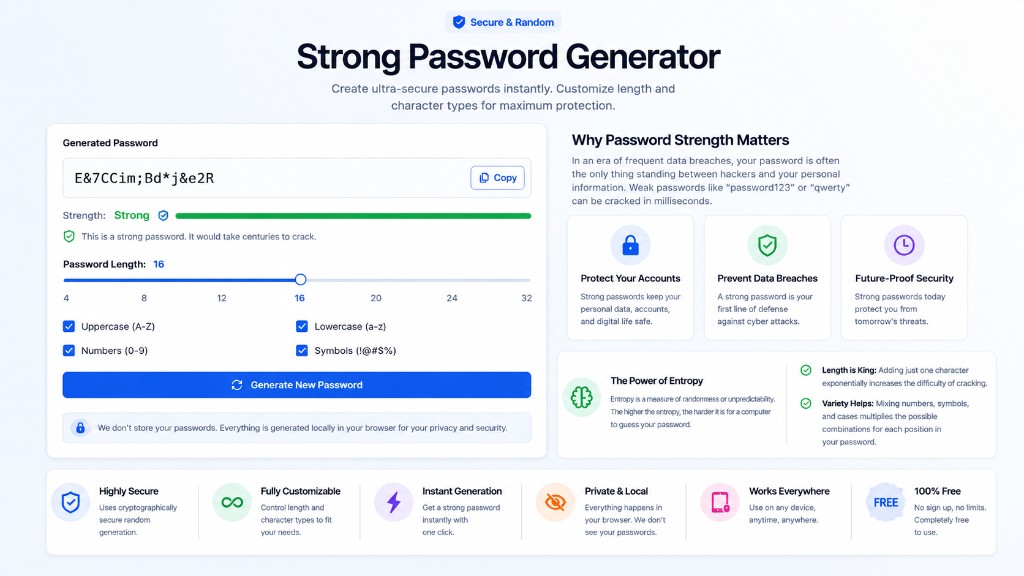
- 1Adjust the password length slider (16+ characters recommended for important accounts).
- 2Enable uppercase, lowercase, numbers, and symbols for maximum entropy.
- 3Click Generate New Password and check the strength indicator.
- 4Copy the password and save it in a password manager — never reuse across sites.
Why Password Strength Matters
In an era of frequent data breaches, your password is often the only thing standing between hackers and your personal information. Weak passwords like "password123" or "qwerty" can be cracked in milliseconds — a strong password generator helps you avoid that risk.
The Power of Entropy
Entropy is a measure of randomness or unpredictability. The higher the entropy, the harder it is for a computer to guess your password.
- Length is King: Adding just one character exponentially increases the difficulty of cracking. A 12-character password is significantly stronger than an 8-character one.
- Variety Helps: Mixing numbers, symbols, and cases multiplies the possible combinations for each position in the password.
For developers needing API keys or secrets, check out our Secret Key Generator instead.
Password Security Tips
Use Long Passwords
Longer passwords (16+ characters) are exponentially harder to crack. Our generator supports up to 64 characters.
Mix Character Types
Combine uppercase, lowercase, numbers, and symbols for maximum security. Each type adds complexity.
Change Regularly
Update your passwords every 3-6 months, especially for sensitive accounts like banking and email.
Avoid Personal Info
Never use birthdays, names, or dictionary words. Random passwords are much more secure.
Use Password Manager
Store your passwords in a reputable password manager. Never reuse passwords across sites.
Enable 2FA
Always enable two-factor authentication when available for an extra layer of security.
Frequently Asked Questions
Is this a free strong password generator online?▼
Yes. This strong password generator is 100% free, runs in your browser, and never sends your passwords to our servers. Generate as many secure passwords as you need with custom length and character rules.
How secure are these generated passwords?▼
Very secure! Our password generator uses cryptographically secure random number generation (CSRNG) to create truly random passwords. A 16-character password with mixed characters would take billions of years to crack with current technology.
What makes a strong password?▼
A strong password is at least 12-16 characters long and includes a mix of uppercase letters, lowercase letters, numbers, and symbols. It should be completely random and not based on dictionary words or personal information.
Are these passwords stored anywhere?▼
No! All password generation happens locally in your browser. We never see, store, or transmit your passwords. Your security and privacy are completely protected.
Should I use symbols in my password?▼
Yes! Including symbols significantly increases password strength. However, some websites don't allow certain symbols, so you can disable them if needed.
How often should I change my passwords?▼
Security experts recommend changing passwords every 3-6 months for important accounts. However, using a strong, unique password for each account is more important than frequent changes.
Can I use this for all my accounts?▼
Absolutely! Generate a unique password for each account. Never reuse passwords across different websites or services, as this creates a security vulnerability.
Related Tools
Explore more free tools to boost your productivity
Random Number Generator
Generate random numbers with custom min/max and count
QR Code Generator
Generate free QR codes for URLs, text, WiFi, and more
Binary Translator
Convert text to binary code and binary back to text instantly
Hex Translator
Convert text to hexadecimal and hex back to text
Slug Generator
Convert any text to URL-friendly slugs for SEO
UUID Generator
Generate unique UUIDs v1, v4, and v5 for your projects