Aspect Ratio Calculator
Use our free aspect ratio calculator to stop guessing dimensions. Calculate the perfect width and height for any video or image so your content fits Instagram, YouTube, and monitors without getting stretched.
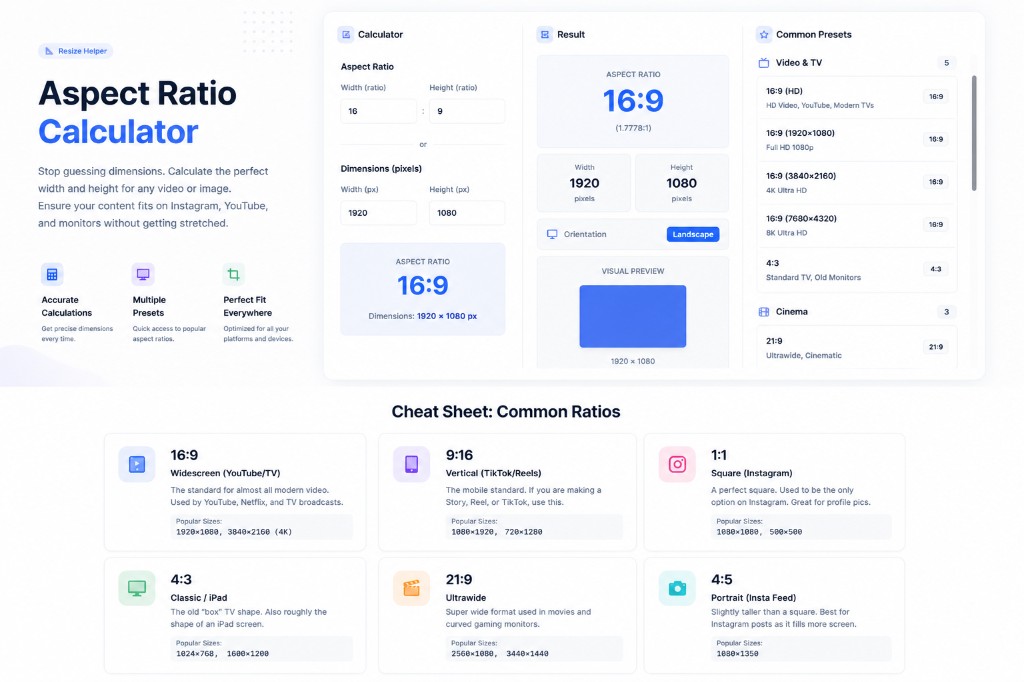
Calculator
Aspect Ratio
16:9
Dimensions: 1920 × 1080 px
Result
Enter values to see the calculation result
Common Presets
Video & TV
Cinema
Photography
Social Media
Displays
Why Does Ratio Matter?
Aspect ratio is just a fancy way of saying "the shape of the rectangle." It tells you how wide an image is compared to how tall it is. It's written as Width:Height (e.g., 16:9).
For example, a standard TV is 16:9. That means for every 16 units of width, it has 9 units of height. If you try to display a 4:3 image (like an old TV show) on it, you get black bars on the sides because the shapes don't match. Using the correct ratio ensures your content uses the full screen without being cropped or stretched.
Why Resolution is Different
Resolution refers to the actual number of pixels (e.g., 1920x1080), while aspect ratio describes the shape. You can have a tiny 16:9 image and a huge 16:9 image — they are the same shape, just different quality. This aspect ratio calculator helps you find the right resolution to match your desired shape.
Common Mistakes to Avoid:
- ×Stretching a 4:3 image to fit a 16:9 screen (makes people look short and wide)
- ×Uploading a horizontal video to TikTok (it will be tiny with huge black spaces)
- ✓The Fix: Use this calculator to find the exact pixel dimensions you need to crop or resize to.
Cheat Sheet: Common Ratios
16:9
📺Widescreen (YouTube/TV)
The standard for almost all modern video. Used by YouTube, Netflix, and TV broadcasts.
Popular Sizes:
1920×1080, 3840×2160 (4K)
9:16
📱Vertical (TikTok/Reels)
The mobile standard. If you are making a Story, Reel, or TikTok, use this.
Popular Sizes:
1080×1920, 720×1280
1:1
⬛Square (Instagram)
A perfect square. Used to be the only option on Instagram. Good for profile pics.
Popular Sizes:
1080×1080, 500×500
4:3
🖥️Classic / iPad
The old "box" TV shape. Also roughly the shape of an iPad screen.
Popular Sizes:
1024×768, 1600×1200
21:9
🎬Ultrawide
Super wide format used in movies and curved gaming monitors.
Popular Sizes:
2560×1080, 3440×1440
4:5
📷Portrait (Insta Feed)
Slightly taller than a square. Best for Instagram posts as it fills more screen.
Popular Sizes:
1080×1350
How to Use the Aspect Ratio Calculator
Pick a Preset
Choose 16:9, 4:3, etc. from the dropdown if you know it.
Enter One Number
Type the width OR height you have (e.g. 1920).
Get the Other
We instantly calculate the matching dimension.
Or Use Custom
Enter both dimensions to find out what ratio they are.
💡 Quick Tips for Creators
- →YouTube: Always use 16:9 (1920x1080). If you upload other ratios, YouTube adds black bars.
- →Instagram Stories/TikTok: Use 9:16 (1080x1920). It's just 16:9 turned sideways.
- →Instagram Posts: 4:5 (1080x1350) takes up the most screen space on a phone feed.
- →Resizing: Lock the aspect ratio in Photoshop/Canva so your image doesn't get squished.
16x9 Aspect Ratio Calculator & Resolution Sizes
Use this free 16x9 aspect ratio calculator (also written 16:9 ratio calculator) when you need widescreen dimensions for YouTube, TV, or desktop video. Enter width or height in pixels and the tool returns the matching side so your export stays undistorted — the same math behind a dedicated 16 9 resolutions calculator.
Common 16:9 resolutions
- 1280×720 — 720p HD
- 1920×1080 — 1080p Full HD (most common YouTube export)
- 2560×1440 — 1440p QHD
- 3840×2160 — 4K UHD
Select the 16:9 preset above, type one dimension (e.g. 1920 width), and copy the calculated height. For vertical mobile video, use the 9:16 preset instead.
Aspect Ratio Calculator — Pixels, Inches, CM & More
People look for an aspect ratio calculator online for many different jobs — video exports, prints, LED walls, and social posts. This page explains how our free aspect ratio calculator fits those searches and what to enter for the best result.
Aspect Ratio Calculator for Pixels
The most common need is an aspect ratio calculator for pixels: you know one side in pixels (e.g. 1920 wide) and need the other height for 16:9. Use the calculator above: pick a preset or enter W:H, then type width or height in pixels. The result shows the matching dimension so your export is never stretched.
Aspect Ratio Calculator from an Image
Searching for aspect ratio calculator from image usually means you want the ratio of an existing photo or frame. On Windows or Mac, open the file's properties or info panel to read width × height in pixels, then paste those two numbers into the calculator to see the simplified ratio (e.g. 1920×1080 → 16:9). You can also use our Image Resizer when you already know the target size.
Image Upload & Physical Units
If you looked for an aspect ratio calculator image upload, this tool works in the browser with numbers you already have: no file upload is required, which keeps your images private. For aspect ratio calculator inches or aspect ratio calculator cm, the math is the same as pixels — only the unit changes. Convert inches or centimeters to pixels using your print DPI (e.g. 300 DPI for print): width_px ≈ width_in × DPI. Then use those pixel values here. For rough stage layouts in feet, convert feet → inches first, then to pixels at your chosen DPI.
Aspect Ratio Calculator for LED Wall & Pro AV
For an aspect ratio calculator for LED wall installations, start from the wall's total resolution in pixels (cabinet columns × cabinet resolution) or the native content raster your processor expects. Enter that width and height to confirm the ratio matches your timeline (often 16:9 or custom widescreen). Extra pixels beyond the wall are handled by scaling; matching aspect ratio at source avoids stretched branding on venue displays.
ARC & Broadcast Notes
Teams sometimes search aspect ratio calculator ARC when checking active format or safe-area conversions between HD, UHD, and cinema rasters. Use the presets here to lock 16:9, 21:9, or DCI-style ratios, then derive pixel dimensions for your master timeline so graphics don't get cropped in distribution.
Frequently Asked Questions
What size should my YouTube video be?▼
YouTube videos should be 16:9. The best quality is 1920×1080 (1080p). You can also do 1280×720 (720p) or 3840×2160 (4K). They all share the same 16:9 shape.
How do I fix a stretched image?▼
An image looks stretched because you changed its width or height without changing the other one proportionally. Use this calculator: enter the original width/height, then enter the NEW width you want. It will tell you the correct new height to keep it looking normal.
What aspect ratio is best for Instagram?▼
For Posts, use 4:5 (1080×1350) because it takes up the most vertical space on a user's phone. For Stories and Reels, you MUST use 9:16 (1080×1920) or it will be cropped.
Is 1920x1080 the same as 16:9?▼
Yes! 1920×1080 is the resolution (number of pixels), and 16:9 is the aspect ratio (the shape). If you divide 1920 by 120 you get 16. If you divide 1080 by 120 you get 9.
What is the ratio for iPhone wallpapers?▼
Most modern smartphones (iPhones, Samsungs) are roughly 9:19.5 or 9:20. Using a 9:16 (1080×1920) image usually works fine, but might be zoomed in slightly.
How do I use an aspect ratio calculator for pixels?▼
Enter your known width or height in pixels in the calculator, choose the ratio (e.g. 16:9), and it returns the other dimension in pixels. That way exports stay sharp and undistorted.
How do I get aspect ratio from an image without uploading?▼
Check the image file properties for width and height in pixels. Type both values into the calculator to see the simplified aspect ratio. No upload is needed and nothing leaves your device.
Can I calculate aspect ratio in inches or centimeters?▼
Yes: convert your physical size to pixels using your print DPI (pixels ≈ inches × DPI), then use those numbers here. For centimeters, convert cm to inches first or use pixels per cm from your design software.
How do I plan aspect ratio for an LED wall?▼
Find the full pixel width and height of the wall (or of your content raster). Enter them to verify the ratio matches your video master. Matching aspect ratio at production time avoids stretched logos on the display.
What is a 16x9 aspect ratio calculator?▼
A 16x9 aspect ratio calculator finds the missing width or height when you know one side and want widescreen 16:9 shape. It is the same as a 16:9 ratio calculator — useful for YouTube, TV, and 1920×1080-style exports.
What resolutions does a 16 9 resolutions calculator use?▼
Common 16:9 resolutions include 1280×720 (720p), 1920×1080 (1080p), 2560×1440 (1440p), and 3840×2160 (4K). Enter any one pixel value and this tool calculates the other dimension.
About the Aspect Ratio Calculator
The Aspect Ratio Calculator performs fast, accurate calculations for everyday and professional tasks. Calculate and convert image aspect ratios for any dimension From age and date math to percentages and random picks, BetterUtils calculators focus on clarity: enter your values, review the breakdown, and copy or reuse the answer.
Teachers, freelancers, parents, and office workers use calculators like the Aspect Ratio Calculator when they need dependable results without opening a spreadsheet. Each calculator explains the logic in plain language so you understand the output, not just the final number.
BetterUtils runs entirely in your browser whenever possible. Your inputs are processed locally on your device and are not uploaded to our servers, stored in a database, or shared with third parties. That makes our tools a practical choice when you are working with personal text, business data, screenshots, or files you do not want to send across the internet.
Whether you visit the Aspect Ratio Calculator once or use it every week, BetterUtils keeps the experience consistent: clear labels, accessible controls, and copy-friendly output. If you are comparing options online, try this page alongside our other calculators to see which workflow feels fastest for your team.
Common use cases
- Personal finance and budgeting estimates
- Project planning and date scheduling
- Education and classroom exercises
- Quick checks during meetings or calls
How to use the Aspect Ratio Calculator
- 1
Open the Aspect Ratio Calculator
Load this page in any modern browser on desktop, tablet, or phone. No account or download is required.
- 2
Enter your input
Type or paste the text, numbers, URL, file, or values you want to process. Settings appear near the main input when customization is available.
- 3
Adjust options
Choose styles, units, formats, or advanced settings that match your task. Defaults work well for quick everyday use.
- 4
Generate the result
Click the primary action button or watch live output update automatically as you edit input.
- 5
Copy, download, or reuse
Copy output to your clipboard, download files when supported, or explore related tools linked below.
Tips for best results
- Double-check input units to avoid order-of-magnitude errors.
- Use today’s date when calculating age or elapsed time.
- Screenshot or copy results you need for records.
- Explore related calculators linked at the bottom of the page.
Why users choose BetterUtils
BetterUtils focuses on speed, clarity, and privacy. The Aspect Ratio Calculator loads quickly on modern browsers, works without creating an account, and keeps processing on your device whenever the tool supports local execution. That makes it practical for daily workflows whether you are drafting social content, preparing homework, shipping a website, or debugging a project on a deadline.
Unlike cluttered download portals, each utility page explains what the tool does, who it is for, and how to get reliable results. You can bookmark the Aspect Ratio Calculator, return from mobile or desktop, and combine it with other free tools in the same session. Explore the related tools section below for complementary generators and converters that complete common tasks end to end.
This page is part of our Calculators collection on BetterUtils. Browse related utilities below or visit the full tools directory to discover calculators, converters, SEO utilities, and creative generators that work in your browser.
Frequently asked questions
How precise is the Aspect Ratio Calculator?
Calculators use standard formulas and show readable results. For legal, medical, or financial decisions, consult a qualified professional.
Can I change date or unit inputs later?
Yes. Update any field and the result recalculates immediately.
Does it work offline?
After the page loads, many calculators continue to work without an internet connection.
Is there a mobile layout?
BetterUtils tools are responsive and usable on phones and tablets.
Are results saved automatically?
No. Copy or screenshot results you want to keep; BetterUtils does not store calculator history.
Can I bookmark the Aspect Ratio Calculator?
Yes. Save this BetterUtils page in your browser or share the link with teammates who need the same free utility.
BetterUtils publishes free utilities without requiring login, subscription fees, or software installations. Pages are designed to load quickly on mobile networks, and help sections are written for beginners as well as experienced creators who need a reliable shortcut during busy workflows.
Related Tools
Explore more free tools to boost your productivity
Length Converter
Convert between meters, feet, inches, centimeters, and more
Image Format Converter
Convert images between JPG, PNG, WebP, GIF, and more formats
Image Cropper
Crop images with custom ratios for social media profiles
Date Difference Calculator
Find the number of days, months, and years between two dates
Age Calculator
Calculate exact age in years, months, days, and hours
Percentage Calculator
Calculate percentages, increases, decreases, and ratios