Glitch Text Generator - Make Zalgo & Cursed Text
Use our free glitch text generator to turn normal text into weird, glitchy "Zalgo" text. Perfect for creeping out your friends on Discord, making unique Instagram captions, or just messing around. No signup needed.
Preview
Select Effect
Customize
Wide Variety of Glitch Text Effects
Zalgo & Glitch Effects
Make your text look corrupted with Zalgo markers (text that goes up and down). Use sliders to control how messy it gets.
Works Everywhere
The text works on Discord, Twitter (X), Instagram, TikTok, and most games. If it supports Unicode, it works.
Instant Preview
Type and see the glitch happen immediately. Adjust the "chaos" level until it looks just right (or completely unreadable).
Total Control
Want it slightly weird or completely destroyed? Use the Top, Middle, and Bottom sliders to customize the corruption.
100% Free
Generate as much cursed text as you want. No paywalls, no character limits, no annoying sign-ups.
One-Click Copy
Hit the copy button and paste it straight into your chat or bio. Or download it as an image if the platform blocks it.
Understanding the Glitch Text Generator & Zalgo
You've probably seen oddly distorted text pop up in comments, captions, or memes — text that looks broken, jittery, or strangely alive (l̵i̵k̵e̵ ̵t̵h̵i̵s̵). It grabs attention instantly, not because something went wrong, but because it's intentionally playful. Our glitch text generator lets you recreate this effect instantly — no coding required.
The History of Zalgo Text
The concept of "Zalgo" text originated from a 2004 internet meme involving corrupted comic strips. The idea was that a dark, chaotic entity named Zalgo was corrupting the images. Users started mimicking this effect in text by stacking excessive diacritical marks on top of letters. Today, it's a staple of internet culture, used in horror fiction, memes, and aesthetic social media bios.
How It Works Technically
This effect comes from Unicode, the system that decides how characters appear on screens. It includes special symbols known as combining characters. These characters don't stand alone — they stack on top of regular letters.
When several of them are layered together, letters start to wobble, stretch, and glitch in fun ways. In linguistics, these marks are called diacritics. Normally, they help with pronunciation in different languages, but here they're used creatively to give text personality.
Despite how wild it looks, nothing is broken. There's no hack, no trick, and no glitch in the system. It's just the standard character set doing something unexpected — and that's why people love it.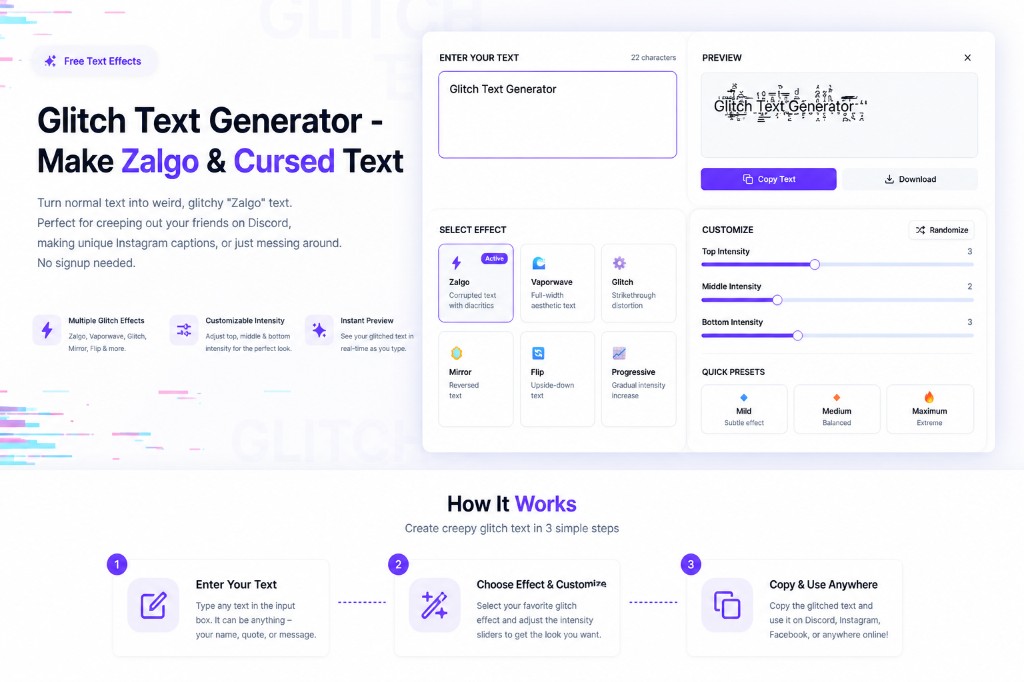
Where to Use Glitch Text
You can copy and paste text created with this glitch text generator into most social platforms and comment sections. Some places may clean it up or remove the extra marks, especially in usernames or email fields, but for captions and comments, it usually works perfectly.
- Discord: Perfect for spooky usernames or server nicknames.
- Twitter / X: Great for "cursed" tweets or getting attention in replies.
- Instagram: Use it in your bio or captions (sparingly) for an edgy aesthetic.
- Gaming: Stand out in in-game chats like Minecraft or Roblox.
And glitch text is just the beginning. With thousands of symbols available, the standard character set lets you experiment with all kinds of decorative and expressive text styles. A fancy text generator opens the door to playful fonts, symbols, and styles that go way beyond plain letters. Whether you need subtle distortion or full chaos, this glitch text generator gives you total control over the effect.
How to Use the Glitch Text Generator
Type Your Text
Enter the sentence you want to glitchify.
Pick a Style
Choose "Zalgo" for the classic scary look, or try Vaporwave/Flip.
Add Chaos
Drag the sliders to add more noise and corruption.
Check It
Look at the preview. Too messy? Dial it back.
Copy & Paste
Click copy and annoy your friends on Discord.
Glitch Text Generator — Platform Guide
Our glitch text generator produces Unicode-based corrupted text that works on almost every platform. Here's exactly how to use it on the most popular ones:
Glitch Text Generator for Discord
Discord is the #1 platform for glitch text. Our glitch text generator for Discord creates Zalgo text, strikethrough, and vaporwave styles that render perfectly in Discord messages, server names, channel topics, and nicknames. Discord fully supports the Unicode combining characters used in Zalgo text. Paste your glitched text into any message box, channel name, or nickname field. A word of caution: extremely long Zalgo text can lag older Discord clients, so keep intensity moderate for server-wide use.
Glitch Text Generator for Roblox
Using our glitch text generator for Roblox lets you create unique usernames, display names, and in-game chat messages that look corrupted and stand out. Roblox supports some Unicode characters in display names and chat, though the platform filters certain combining characters to prevent chat abuse. Use the "Vaporwave" or "Strikethrough" effects for Roblox as they tend to pass through filters better than heavy Zalgo. For Roblox mobile, generate on desktop and copy-paste into the mobile app.
Glitch Text Generator for Minecraft
Our glitch text generator for Minecraft can be used for player names on Java Edition servers that support Unicode, book text, sign text, and in-game chat. Standard Zalgo text works in Minecraft Java Edition chat and books. Use light to medium intensity settings — heavy Zalgo can cause rendering issues on some server clients. The "Mirror" and "Strikethrough" effects are especially popular for Minecraft server names and in-game books.
Glitch Text Copy and Paste
All glitch text is ready for instant copy and paste. Click the "Copy Text" button in the preview panel and paste directly into any platform — Discord, Roblox, Minecraft, Instagram, Twitter/X, or anywhere else. The glitched characters are standard Unicode, so they travel perfectly when pasted. No formatting is lost between devices or platforms.
Save Glitch Text as an Image
Some platforms strip Zalgo characters or block pasting corrupted text in certain fields (like strict username inputs). In that case, save your glitch text as an image: take a screenshot of the preview box, or paste the text into a design tool like Canva and export it as PNG or JPG. You can then share the image to show the glitch effect even where text pasting is restricted.
Glitchy Text Generator & Low Quality Text
Searching for a glitchy text generator or low quality text generator? Both describe the same effect: Unicode combining marks that make letters look corrupted, pixelated, or "broken." Use Zalgo presets for heavy distortion, or lighter settings for a subtle low-res aesthetic. Also try our dedicated Cursed Text Generator for adjustable creep intensity.
Examples of Aesthetic Text Styles
Zalgo / Cursed
Classic "cursed" text with markings dripping down and reaching up.
Vaporwave
Full-width characters for that 80s/90s retro digital vibe.
Strikethrough
Text with a line through it, like it has been redacted.
Mirror
Reversed text. Hard to read, fun to use.
Upside Down
Literally flips your text upside down.
Progressive Chaos
Starts normal and gets more corrupted as the sentence goes on.
Frequently Asked Questions
How does this glitch text work?▼
It uses "combining characters" from Unicode. Basically, normal letters can have special markers added on top or bottom (like accents). We just stack a LOT of them to make it look broken and glitchy.
Why does it look like boxes on my phone?▼
If you see squares or boxes (□□□), it means your device or browser doesn't have a font that supports those specific glitch characters. It usually works fine on modern iPhones, Androids, and Windows PCs.
Can I get banned for using this on Discord?▼
Generally, no. It's just text. However, if you spam massive walls of Zalgo text that lag the chat, server mods might mute or ban you for spamming. Use it responsibly!
Is this different from a font?▼
Yes. You don't need to install anything. This isn't a "font" file; it's just standard text characters that look weird. That's why you can copy-paste it anywhere.
How do I make it scary text?▼
Select the "Zalgo" preset and crank the "Up" and "Down" sliders to the max. This creates the "dripping" effect often associated with creepypastas and cursed images.
Can I use this for my Instagram bio?▼
Absolutely. It's a great way to make your bio stand out. Just keep in mind that too much glitching might make it hard for people to actually read your name.
Is it really free?▼
Yes. BetterUtils is free. We just show a couple of ads to keep the servers running. No premium unlock required.
What is Zalgo?▼
Zalgo is an internet meme and art style involving text or images that appear corrupted or "possessed." The text style (using combining diacritics) became known as Zalgo text.
How do I use the glitch text generator for Discord?▼
Generate your glitch text using the Zalgo or Strikethrough effect, click "Copy Text", then paste it into any Discord message, nickname, channel name, or server name. Discord fully supports Unicode combining characters. Avoid maximum intensity Zalgo in large servers as it can lag older clients.
Does the glitch text generator work for Roblox?▼
Yes, partially. Roblox supports some Unicode characters in display names and chat. The Vaporwave and Strikethrough effects work best on Roblox as they pass content filters more reliably than heavy Zalgo. Generate your text, copy it, and paste into the Roblox display name field or chat on both desktop and mobile.
Can I use this glitch text generator for Minecraft?▼
Yes! Glitch text works in Minecraft Java Edition chat, books, and signs. Use light to medium Zalgo intensity for best results — heavy corruption can cause rendering issues on some server setups. Mirror and Strikethrough effects are popular for Minecraft usernames and in-game books.
How do I copy and paste glitch text?▼
Click the "Copy Text" button in the preview panel after generating your glitch text. The corrupted text is copied to your clipboard and can be pasted (Ctrl+V or long-press → Paste) into any platform that accepts Unicode text: Discord, Roblox, Instagram, Twitter, Minecraft chat, and more.
Can I save glitch text as an image?▼
Yes. If a platform blocks pasting Zalgo characters, take a screenshot of the preview area or paste the text into a design tool like Canva and export as PNG/JPG. You can then share the glitch effect as an image on platforms that restrict Unicode text input.
Is this a glitchy text generator or low quality text generator?▼
Yes — both terms describe the same tool. Glitchy text uses Unicode combining characters to mimic corrupted or low-quality display. Adjust Zalgo intensity for subtle grain or maximum chaos.
Related Tools
Explore more free tools to boost your productivity
Discord Font Generator
17 font styles for Discord messages and server names
Strikethrough Text Generator
7 strikethrough and crossed-out text styles
Upside Down Text Generator
Flip your text upside down for social media posts
Wide Text Generator
Fullwidth/aesthetic spaced-out text (Wide Text)
Slash Text Generator
Add slash marks through your text for a unique style
Fancy Text Generator
45+ Unicode font styles for Instagram, TikTok & Discord bios