Facebook Fonts Generator
Use our free Facebook fonts generator (often searched as "Facebook font generator" too) to make posts, comments, and your bio stand out with bold, italic, script, and other Unicode styles. Everything is copy and paste — no extra app — and works in the Facebook mobile app or on desktop.
Why Use Stylish Fonts on Facebook?
A dedicated Facebook fonts generator turns plain typing into eye-catching Unicode styles that still behave like normal text in posts, comments, and bios.
Stand Out
Make your posts and comments more noticeable in crowded Facebook feeds.
Professional Look
Perfect for business pages and professional profiles that want to look unique.
Increase Engagement
Stylish text catches attention and can lead to more likes, comments, and shares.
Fully Compatible
All fonts work perfectly on Facebook - posts, comments, bio, and Messenger.
Mobile Friendly
Works on Facebook mobile app and desktop. Copy and paste from any device.
Free Forever
No registration, no limits. Generate unlimited stylish Facebook text for free.
How to Use the Facebook Fonts Generator
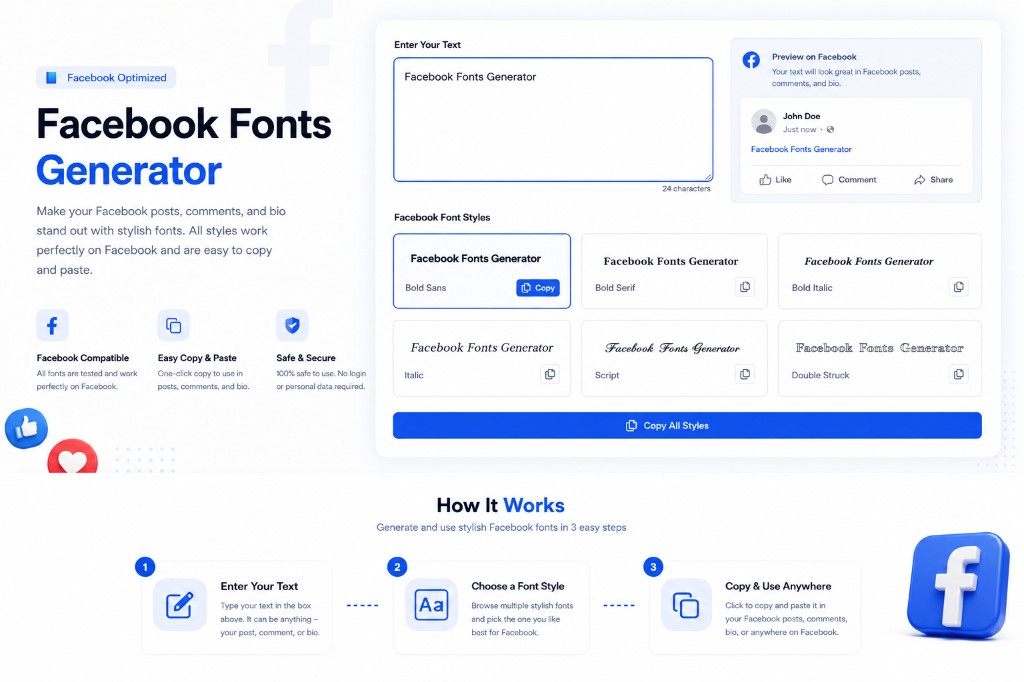
Facebook doesn't have built-in font options for regular posts and comments, but you can use Unicode characters to create stylish text that stands out. This Facebook fonts generator makes it easy — type your text, choose a style, and copy it to Facebook.
Computers store text as Unicode code points. This Facebook fonts generator maps your regular letters to special Unicode symbols (for example bold mathematical letters) so the result looks like a different font but stays real, selectable text on Facebook.
These fonts work in Facebook posts, comments, bio/about section, photo captions, and even in Messenger. They're actual text characters (not images), so they're searchable and work on all devices.
Popular uses include: making announcements stand out, creating eye-catching business page posts, adding personality to your profile bio, highlighting key information in long posts, and making your comments more noticeable in busy threads.
Search trends show people look for a Facebook fonts generator with specific looks — bold headlines, italic emphasis, cursive or script flair, or underline-style Unicode — then want to copy and paste into a post or comment. Many also type "Facebook font generator" (singular) or add words like bold, italic, cursive, or strikethrough; this page focuses on Facebook-friendly styles below, and our Fancy Text Generator adds extras such as strikethrough if you need them. This page is a browser-based tool (no separate install like a native app); save it to your home screen for quick access on your phone. For Bangla and many other non-Latin scripts, fancy Unicode styles are mostly built for Latin letters, so results may be limited compared to English text.
If you are also posting on other platforms, check out our Instagram Fonts for bio ideas or the general Fancy Text Generator for even more styles like Zalgo and Glitch text.
Pro Tips for Facebook Engagement
Using stylish fonts is just one part of the equation. To maximize your engagement:
- Use Bold for Headlines: People scroll fast. Stop them with a bold headline in your post.
- Keep it Readable: Don't use complex script fonts for long paragraphs. Save them for short quotes or sign-offs.
- Highlight Keywords: Use italic or circled text to emphasize specific words (like Sale or ⒸⓄⓃⓉⒺⓈⓉ).
- Test on Mobile: Most Facebook users are on mobile. Ensure your chosen font looks good on a small screen.
Best Facebook Font Styles for Different Purposes
Business Announcements
Use bold fonts to make important business updates stand out.
Profile Bio
Add personality to your Facebook bio with elegant script fonts.
Event Promotions
Make event posts more eye-catching with decorative fonts.
Group Posts
Stand out in Facebook groups with unique text styles.
Photo Captions
Add stylish captions to your photos that match your aesthetic.
Call to Action
Emphasize CTAs in your posts to drive more engagement.
Frequently Asked Questions
Can I use these fonts in my Facebook name?▼
Facebook has restrictions on special characters in names. While some Unicode characters might work, Facebook may reject names with too many special characters. These fonts work best in posts, comments, and bio sections.
Will these fonts work in Facebook Messenger?▼
Yes! All these fonts work perfectly in Facebook Messenger. Just copy the styled text and paste it into your message. It's a fun way to add personality to your chats.
Do Facebook fonts work on mobile?▼
Absolutely. These fonts work on the Facebook mobile app for both iOS and Android. Just copy the text from our generator and paste it into the Facebook app.
Can I use stylish fonts in Facebook ads?▼
While technically possible, Facebook's ad policies may restrict certain special characters in ad copy. It's best to use these fonts in organic posts and test carefully if using in ads.
Which font style gets the most engagement on Facebook?▼
Bold Sans and Circled fonts tend to perform well because they're eye-catching but still readable. However, the best style depends on your audience and content type. Test different styles to see what works for you.
Will using fancy fonts affect my Facebook reach?▼
No, using Unicode fonts doesn't negatively impact your reach. However, make sure your text is still readable - if people can't understand your post, they won't engage with it, which could indirectly affect reach.
Can I use these fonts for my Facebook business page?▼
Yes! Many businesses use stylish fonts to make their posts stand out. Just ensure the text remains professional and readable. Bold and Script fonts work particularly well for business pages.
Are these fonts safe to use on Facebook?▼
Yes, these are standard Unicode characters that are completely safe to use. They won't harm your account or violate Facebook's terms of service. They're just text characters, not code or scripts.
Does this Facebook font generator include bold, italic, cursive, and decorative styles?▼
Yes. Previews include bold sans, bold serif, bold italic, italic, script (cursive-style), double-struck, fraktur, circled, and underlined Unicode. Click any card to copy, then paste into Facebook. If you specifically want strikethrough or rare glitch styles, use our Fancy Text Generator for a larger style list.
Do I need a Facebook font generator app?▼
No. BetterUtils runs in your web browser on iPhone, Android, and desktop. You can bookmark this page or add it to your home screen for fast access — no app store download required.
Can I use this Facebook font generator for Bangla (Bengali) text?▼
Most stylish Unicode fonts are designed around Latin letters (A–Z). Bangla and several other scripts may not have matching bold, script, or circled variants, so your text might stay plain or only partially change. For best results, try English or Latin characters first.
Can I get colored fonts for Facebook with this generator?▼
Facebook controls text color in the composer, so you cannot paste true multi-color or custom RGB fonts from a generator. This tool focuses on letter shapes and weights (bold, script, circled, etc.) using Unicode — those styles stay consistent across devices.
Related Tools
Explore more free tools to boost your productivity
Fancy Text Generator
45+ Unicode font styles for Instagram, TikTok & Discord bios
Aesthetic Text Generator
Vaporwave and aesthetic fullwidth text for social media
Emoji Text Generator
Add emojis between letters and around text for social media posts
Instagram Bio Generator
Create the perfect Instagram bio with fonts, symbols, and emojis
Symbol Generator
Browse and copy thousands of Unicode symbols, arrows, and special characters
Instagram Fonts Generator
Copy-paste Unicode fonts for Instagram bio and captions