Instagram Bio Generator
Our free instagram bio generator helps you write a polished profile bio in seconds — templates, Unicode fonts, symbols, line breaks, and emojis — with a live 150-character counter so you never exceed Instagram's limit.
Choose a Template
Font Style
Popular Bio Symbols
What is an Instagram Bio Generator?
An instagram bio generator is a free tool that helps you craft a compelling, well-formatted profile bio within Instagram's 150-character limit. Your bio is the first thing visitors see when they land on your profile — it determines whether they follow you or click away. A great bio communicates who you are, what value you offer, and includes a clear call to action.
Creators often look for an instagram bio generator with emojis, symbols, and aesthetic fonts — not just plain sentences. Our generator provides professionally designed templates for creators, brands, fitness enthusiasts, artists, travelers, and lifestyle influencers. Each template uses Unicode symbols and special characters to add visual structure without using images — a powerful trick used by top Instagram accounts to stand out in the feed. For more copy-paste font styles, try our Instagram Fonts or Fancy Text Generator.
How to Use the Instagram Bio Generator
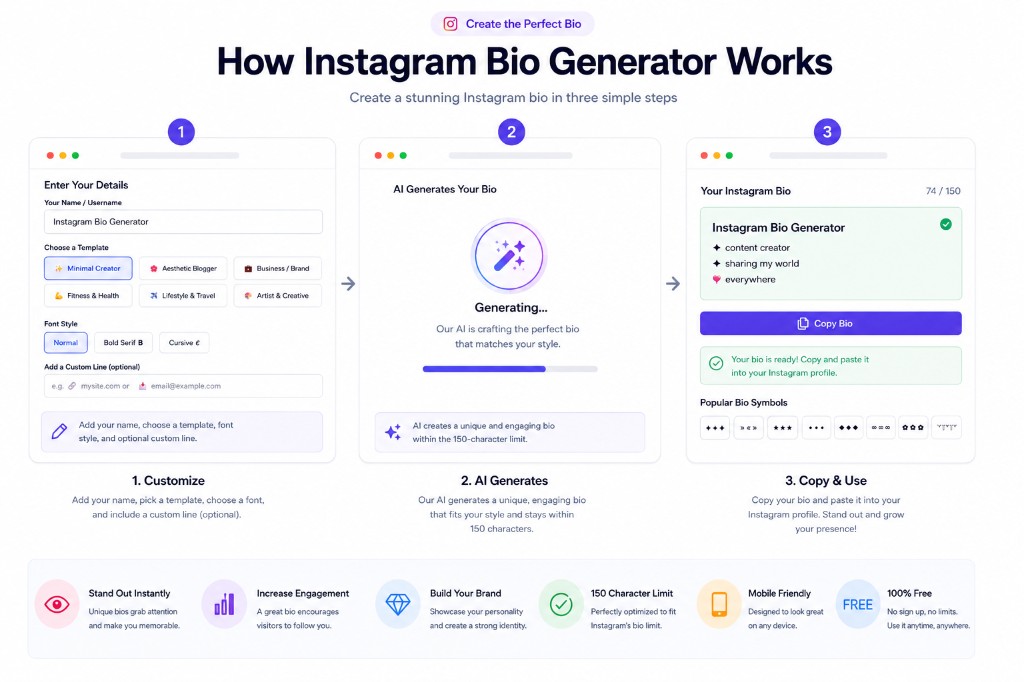
Follow the steps below for a fast workflow: template → font → optional custom line → generate → copy. If you want more long-tail inspiration, combine this with real instagram bio ideas from your niche (travel, fitness, business) and keep keywords near the top line.
- 1Enter your name or Instagram username so the bio is personalized.
- 2Select a template that matches your account type or niche.
- 3Choose a font style — Normal for accessibility, Bold or Cursive for aesthetic flair.
- 4Optionally add a custom line like your website URL or booking email.
- 5Click Generate Bio and preview the result with the character counter.
- 6Copy the bio with one click and paste it directly into Instagram's bio field.
Frequently Asked Questions
Is this an Instagram bio generator with emojis and symbols?▼
Yes. Templates include Unicode symbols and emoji-friendly spacing. You can also paste your own emojis into the custom line field. If a symbol looks like a box on an older phone, swap it for a simpler character.
How long can an Instagram bio be?▼
Instagram bios are limited to 150 characters. Our tool includes a real-time counter so you always know exactly how many characters you have left before hitting the limit.
Can I use the fancy fonts in my Instagram bio?▼
Yes! Instagram supports Unicode characters, which means the bold and cursive styles generated by this tool display correctly in bios, captions, and comments. They are not actual fonts — they are different Unicode characters that happen to look like styled text.
Will line breaks work in my Instagram bio?▼
Yes. Our generated bios include line breaks. When you paste the bio into the Instagram app on mobile, the line breaks will be preserved. Note that pasting via the web browser sometimes strips formatting — use the mobile app for best results.
Do the symbols show on all devices?▼
Most Unicode symbols used in our templates are supported on all modern iOS and Android devices. Older devices may display some symbols as blank squares, so preview on your target device before finalizing.
How do I add a clickable link to my bio?▼
Instagram only allows one clickable URL in your bio, added through the profile edit screen in the "Website" field. The link text in the bio (like "🔗 mysite.com") is just visual — paste your actual URL into the Website field for it to become clickable.
Related Tools
Explore more free tools to boost your productivity
Emoji Text Generator
Add emojis between letters and around text for social media posts
Symbol Generator
Browse and copy thousands of Unicode symbols, arrows, and special characters
Character Counter
Track character limits for Twitter, Instagram, TikTok, and more
Nickname Generator
Generate cool, funny, and unique nicknames for gaming and social media
TikTok Font Generator
Cool Unicode font styles for TikTok bios and captions
Facebook Fonts Generator
Stylish Unicode fonts for Facebook posts and profile names