Future Trends: AI and Free Web Utilities in Content Creation
AI generates drafts, images, and outlines fast. Free content creation tools handle what it doesn't: formats, metadata, structured data, and AI-crawler readiness.
AI can write your draft, generate your hero image, and outline your next ten posts before lunch. What it doesn't do is format any of that for the systems that actually read it - browsers, search crawlers, and increasingly, other AI systems.
Free content creation tools handle that gap. Converting formats, generating structured data, validating what you're about to publish - none of it is glamorous, and all of it decides whether the content AI helped you produce actually works once it's live.
This covers where that gap shows up, including a piece of infrastructure most content guides haven't caught up to yet: llms.txt, the file that tells AI systems how to read your site.
Free Content Creation Tools for the Work AI Skips
AI content generation tools hand you text. An AI image generator hands you a PNG at whatever resolution it defaults to. Neither one asks what CMS you're using, what your image pipeline expects, or whether your site has a machine-readable description of itself at all.
That's not a flaw in the AI tools - it's just outside their job. The formatting, converting, and structuring work has always sat between draft and publish. AI made the draft faster; it didn't touch the part after.
What AI generators hand you
Readable text, a usable image, sometimes a rough outline. Fast, genuinely useful, and just the first layer of a page that a browser, a search engine, and an AI crawler all need to interpret correctly.
What they leave for you to do
Converting the image to the right format. Writing metadata that isn't generic. Validating any structured data your page relies on. And now, increasingly, telling AI systems what your site actually is.
Preparing Content for AI Crawlers, Not Just Search Crawlers
For two decades, robots.txt has told search engines what to crawl. The Robots.txt Generator still handles that, and it still matters - a misconfigured robots.txt can quietly block a site from search entirely.
What's new is llms.txt, a plain-text file placed at your site's root that describes your content specifically for AI systems - what the site is, what matters on it, and how an AI assistant should represent it when asked.
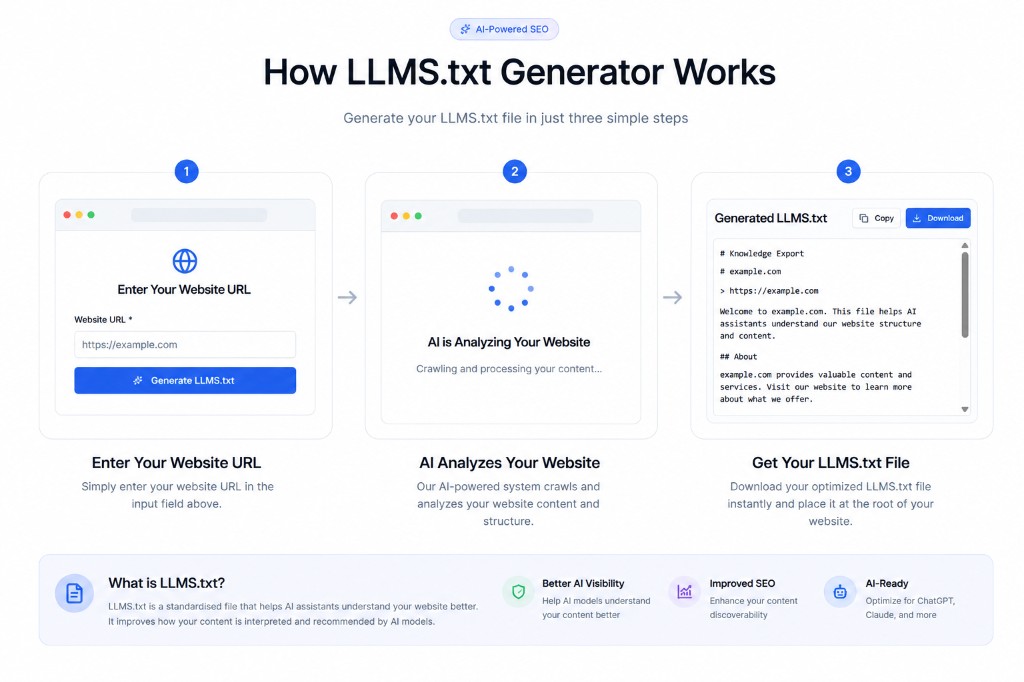
The LLMS.txt Generator crawls your site and produces this file automatically. It's early infrastructure, not yet a universal standard, but the sites adopting it now are the ones AI assistants will describe accurately later.
This is the clearest example of structured data for AI systems specifically, rather than for search engines. It turns your site into AI-readable content instead of something a crawler has to guess at from prose alone.
Converting and Embedding the Assets AI Generates
AI image tools default to PNG more often than not, even for photographic output where it's the wrong choice - PNG's lossless compression makes the file far larger than a JPEG or WebP of equivalent visual quality.
Image format conversion is the fastest fix here. Run AI-generated images through the Image Format Converter before they go anywhere near a live page, then the Image Compressor to cut the file size further without a visible quality loss.
For small inline graphics - icons, logos, tiny decorative assets - the Image to Base64 tool embeds the file directly into your CSS or HTML, removing a network request. It only pays off on genuinely small files; base64 adds roughly a third to the encoded size.
Structuring Data So Machines Can Read It Correctly
A page can look perfect to a person and still be unreadable to a machine if the structured data behind it is malformed. One trailing comma in a JSON-LD block and the whole thing silently fails to parse.
Run any structured data through the JSON Validator before it ships. The JSON Formatter is useful when you inherit a minified block from a template and need to actually read what it says.
The whole point of machine-readable content is that a program can parse it without guessing at meaning from surrounding prose - which only works if the syntax underneath it is actually valid.
Metadata Still Has to Be Written By Hand
AI can draft a meta description, but it doesn't know where search engines actually truncate a snippet, and it won't verify the result against the real cutoff. The Meta Tag Generator builds tags at the length that's actually displayed.
Once a page is live, run the URL through the Open Graph Checker. This catches the most common publishing mistake: a share card with no image, or one still pointing at a placeholder from a template.
Meta tags for AI systems don't exist as a formal standard yet, the way llms.txt is starting to. Until one does, accurate, unpadded metadata is the closest equivalent - it's still what most AI tools fall back on when summarizing a page.
A Publish-Readiness Checklist for AI-Assisted Content
A content publishing checklist worth running once per piece: seven checks, seven free tools, before anything goes live.
| Check | Tool | What it catches |
|---|---|---|
| AI crawler visibility | LLMS.txt Generator | No machine-readable description of your site |
| Search crawler rules | Robots.txt Generator | Pages accidentally blocked from indexing |
| Image format | Image Format Converter | Oversized PNGs where WebP or JPEG fits better |
| Image file size | Image Compressor | Slow-loading pages from unoptimized assets |
| Structured data syntax | JSON Validator | Silently broken JSON-LD blocks |
| Meta title & description | Meta Tag Generator | Tags that get truncated in search results |
| Share preview | Open Graph Checker | Missing or placeholder preview images |
Common Mistakes When Publishing AI-Generated Content
The same handful of gaps show up across most AI-assisted content workflows.
- Publishing AI-generated images at their default PNG export without converting or compressing them
- Assuming an AI-written meta description is the right length without checking it against the real search cutoff
- Never validating structured data, so a single syntax error breaks rich results silently
- Having no llms.txt file at all, leaving AI assistants to guess at what a site actually offers
- Reusing one Open Graph image across every AI-assisted post instead of updating it per piece
Expert Tips for AI-Assisted Publishing
Treat format and metadata work as a fixed step after the AI draft, not an optional cleanup pass. Build it into the same routine every time: convert images, validate structured data, check metadata, confirm the share preview.
Revisit your llms.txt file periodically as your content changes. It's not a one-time setup - a file describing a site that no longer matches the site is worse than no file at all, because it actively misleads whatever reads it.
Frequently Asked Questions
What is llms.txt and do I actually need one?
It's a plain-text file at your site's root that describes your content for AI systems to reference. It's not yet a universal standard the way robots.txt is, but adopting it now positions your site to be represented accurately as AI assistants rely on it more.
Does AI-generated content need different formatting than human-written content?
Not different, just the same formatting work someone has to do regardless of who or what wrote the draft - correct image formats, valid structured data, accurate metadata. AI speeds up the writing, not the publishing checklist.
Why do AI image generators default to PNG?
PNG is a safe, lossless default that avoids visible compression artifacts in generated output. It's just the wrong choice for photographic content going on the web, where WebP or JPEG produces a much smaller file at equivalent visual quality.
What happens if my structured data has a syntax error?
It typically fails silently. The page still renders normally for a human visitor, but search engines and AI systems parsing the structured data get nothing usable from it, which quietly costs you rich results and accurate AI summaries.
Should I still use robots.txt if I add an llms.txt file?
Yes, they do different jobs. Robots.txt controls what search crawlers can access. Llms.txt describes what your content actually is for AI systems. Most sites will end up using both.
Conclusion
None of this replaces good writing, and none of these free content creation tools cost anything. What they do is close the gap between a fast AI draft and a page that actually works for the browsers, crawlers, and AI systems that will read it.
Start with whichever gap costs you the most right now - broken share previews, oversized images, or a site with no llms.txt file at all - and work through the rest from there.
Sources & further reading
Tools mentioned in this guide
Ready to try it yourself?
Use our free tool to get started right away. No signup required!
Try the Tool Now →Related reading
- How to Enhance Your Marketing Campaigns with Free Digital Tools
Free marketing tools to check metadata, share previews, ad copy, creative assets and QR codes before your next campaign launches. No budget required.
- JSON Formatter: How to Format, Validate & Beautify JSON Online
A complete guide to using a JSON formatter — how to beautify minified JSON, validate syntax, understand common errors, and work with JSON in APIs and web development.
- Image Compressor Guide: Reduce File Size Without Losing Quality
Learn how an image compressor works, the difference between lossy and lossless compression, and how to reduce image file size for faster websites and easier sharing.
- Boost Your Social Media Presence with Free Text and Image Tools
Grow your reach without a design budget. Free font generators, bio builders, image resizers and QR tools that make your social posts stop the scroll.