How to Choose the Right Free Online Utility for Your Business Needs
Not every free online utility is worth trusting with your business. Five questions to ask before you adopt one - data, cost, lock-in, and longevity.
There are thousands of tools online claiming to solve the same small problem, and most small business owners don't have time to test each one before trusting it with real work.
A free online utility is only worth adopting if it clears a few specific questions first - not "does it look professional" but "what happens to my data," "is this actually free," and "will it still work in six months."
This is the framework, applied to real BetterUtils tools spanning a calculator, a converter, and a generator, so you can see the questions answered rather than just listed.
What a Genuinely Free Online Utility Should Do
A free online utility earns that description by doing one specific job completely, without asking for anything beyond the input the job actually requires. That sounds obvious, and most tools still fail it.
Five questions separate a tool worth building a habit around from one that's going to waste your time later: does it do one job well, what happens to your data, is it actually free, does it lock you into an account, and will it still work in six months.
Does It Do One Job Well?
A single-purpose tool is usually more reliable than a bundled suite trying to do ten things, because there's less surface area for something to break and less interface to learn for a task that should take seconds.
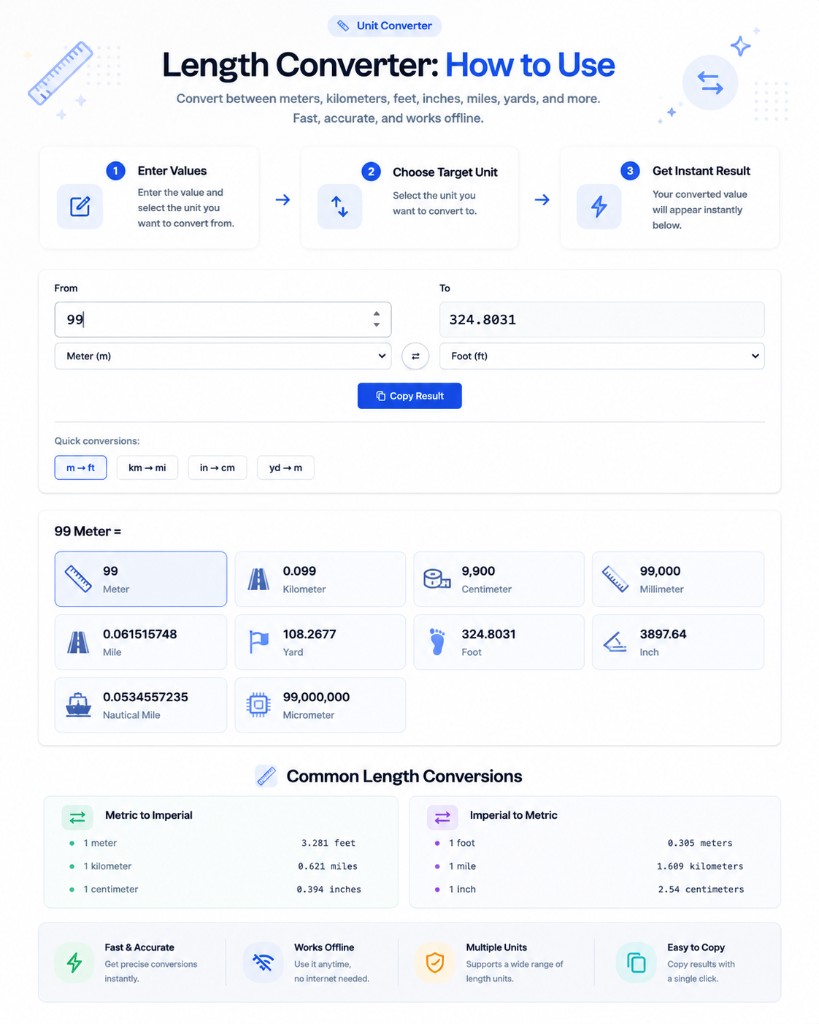
The Length Converter is a clean example of a free converter tool done right. Enter a value, pick a unit, get every common conversion at once - meters, feet, miles, yards - with nothing extra competing for your attention on the page.
The test is simple: if you have to hunt through menus to do the one thing you came for, the tool has already failed the first question, no matter how many features it lists elsewhere.
What Happens to Your Data?
For a small business, this question matters more than it looks like on the surface, because tools regularly touch things like client names, draft pricing, or login credentials without you thinking of it as sensitive data.
A client-side tool processes everything inside your browser instead of sending it to a server, which you can verify yourself: open your browser's network tab while using the tool, and if nothing gets sent, nothing left your device.
The Password Generator works this way - it creates a password locally with no signup required, so the credential you're generating was never transmitted anywhere during creation. That's a meaningfully different data privacy small business posture than a tool that emails you the result.
Is It Actually Free, or a Trial Funnel?
A lot of "free" tools are a free trial funnel wearing a free label - full access for fourteen days, then a paywall, then your saved work becomes a bargaining chip to get you to subscribe.
Test this before you rely on a tool: use its core function twice, on two different days, without creating an account. If it still works exactly the same both times, it's genuinely free. If it starts asking for a card or a login, it wasn't.
Why account lockout is the real cost
Account lockout doesn't show up in a price comparison, but it's the actual cost of a lot of "free" tools - your data or your work sits behind a login you now depend on, and that dependency is worth more than the money you saved.
Will It Still Work in Six Months?
Tool longevity is hard to judge upfront, but a few signals help. A free calculator tool that runs entirely in your browser, like the Percentage Calculator, has no server to go down and no subscription tier to get discontinued.
Tools that depend on a third-party API - live currency rates, a video platform's servers - are more fragile by nature, since they break the moment that dependency changes even if the tool itself is fine. That's not a reason to avoid them, just something worth knowing going in.
A Quick Evaluation Checklist
Five questions, applied to any free online utility before you build a habit around it.
| Question | Good sign | Warning sign |
|---|---|---|
| Does it do one job well? | Focused interface, fast result | Bundled features, cluttered page |
| What happens to your data? | Nothing sent on network tab check | Requires upload before it works |
| Is it actually free? | Same result, no account, day 1 and day 30 | Paywall or login appears after initial use |
| Does it lock you into an account? | No signup required for core function | Work saved only inside an account |
| Will it still work in six months? | Runs standalone in your browser | Depends on a third-party API or platform |
Common Mistakes Small Businesses Make Choosing Tools
A handful of habits account for most of the wasted evaluations.
- Judging a tool by how polished the landing page looks instead of actually testing the core function
- Creating an account before confirming the tool does what you need, making it harder to walk away later
- Assuming free means privacy-friendly, without checking whether the tool sends data to a server
- Building a workflow around a tool that depends on a third-party platform without a backup plan
- Never testing the tool a second time on a different day before trusting it with real work
Expert Tips for Evaluating New Tools Fast
Run the five-question framework in under two minutes for most tools - it doesn't require technical knowledge, just checking whether the tool asks for more than the job needs. Use it every time you evaluate online tools for the business, not just the first time.
Keep a short list of free business tools that already passed the test, and default to those before searching for something new. Consistency in your toolset saves more time than finding a marginally better option every month.
Frequently Asked Questions
How can I tell if a free tool is sending my data to a server?
Open your browser's developer tools, go to the Network tab, and use the tool normally. If no request fires when you generate or process your input, the tool is working entirely inside your browser and nothing gets sent.
Is it safe to use free tools for business data like client names or pricing?
It depends entirely on whether the tool is client-side. A tool that processes everything in your browser never transmits that data anywhere. A tool that uploads to a server should be evaluated more carefully before you trust it with anything sensitive.
Why do some free tools eventually start charging?
Most free-to-paid transitions are deliberate: the free tier exists to get you dependent on the tool before the paywall appears. Testing a tool without creating an account, over more than one session, is the fastest way to catch this early.
Are single-purpose tools actually better than all-in-one platforms?
For most specific tasks, yes - a single-purpose tool has less to go wrong and less interface to learn. All-in-one platforms make sense when you genuinely need several connected features, not when you're doing one task occasionally.
What's the biggest red flag when evaluating a new online tool?
Being asked to create an account or upload data before you've even tried the core function once. A tool confident in its own usefulness lets you test it first and asks for commitment only after you've seen the value.
Conclusion
None of these five questions take long to answer, and asking them upfront costs far less than discovering the answer after a tool has already become part of how your business runs.
The next time you're about to adopt a free online utility, run it through this checklist first. A tool that passes all five is one you can actually rely on.
Sources & further reading
Tools mentioned in this guide
Ready to try it yourself?
Use our free tool to get started right away. No signup required!
Try the Tool Now →Related reading
- Why Privacy-Focused Web Utilities Are Essential for Marketers
Privacy-focused web utilities run entirely in your browser, so campaign data, passwords, and previews never touch a third-party server. Here's why that matters.
- How to Use BetterUtils Tools for Efficient Content Creation
Efficient content creation with free BetterUtils tools: draft, tighten, visualize, format, and verify one piece of content before it ever goes live.
- Password Generator Guide: Create Strong, Secure Passwords
Learn how a password generator creates strong, secure passwords that protect your accounts. Understand what makes a password uncrackable and best practices for password management.
- Age Calculator: Calculate Your Exact Age in Years, Months & Days
Learn how an age calculator works, what it can tell you beyond just years, and how to use it for birthdays, retirement planning, medical forms, and more.