Why Privacy-Focused Web Utilities Are Essential for Marketers
Privacy-focused web utilities run entirely in your browser, so campaign data, passwords, and previews never touch a third-party server. Here's why that matters.
Most marketing tools work the same way: you upload a file or paste in data, a server processes it, and a result comes back. That round trip is invisible until you stop to ask where the data actually went.
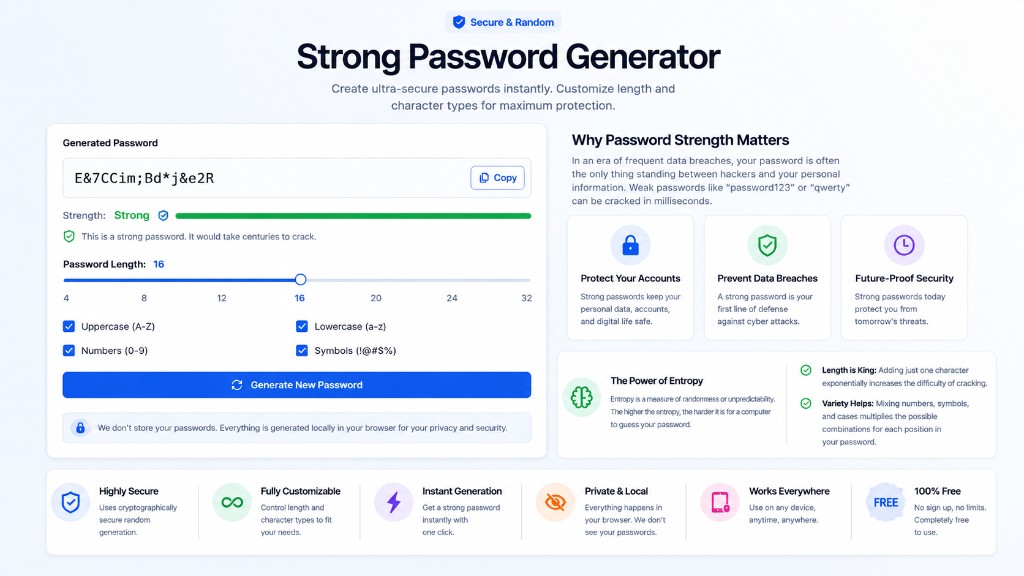
Privacy-focused web utilities skip that step entirely. As browser-based tools, the processing happens in your browser, on your device, and nothing about the campaign asset, password, or customer-adjacent data you're working with gets sent anywhere.
This matters more for marketers than most job functions, because marketing work constantly touches data that shouldn't casually leave your machine - shared logins, customer lists behind a QR code, screenshots with real names in them.
What Privacy-Focused Actually Means for a Web Tool
The term gets used loosely, so it's worth being precise. A genuinely privacy-focused tool runs its core logic in JavaScript, inside your browser tab, using your device's own processing power rather than sending the input to a server.
That's a mechanism, not a marketing claim. It's verifiable: open your browser's network tab while using the tool, and if nothing gets sent when you generate a password or compress an image, the claim holds. If it does, it doesn't.
The mechanism: client-side vs server-side
Client-side tools do the work with code that already downloaded to your browser - no data upload required because there's nothing to send. Server-side tools need your input to reach their server before anything happens, which means it travels across a network first.
This is closely related to the same-origin rules browsers enforce by default: a page generally can't quietly read or send data to a different domain without an explicit request, which is exactly the kind of request you can catch in the network tab.
What still has to leave your browser
Some tools are server-side by necessity, not choice. A tool that generates an llms.txt file has to crawl your live website from a server, and a video downloader has to fetch content from another platform. Those aren't privacy-focused in this sense, and shouldn't claim to be.
Where Marketers Handle Data They Shouldn't Upload
Campaign work involves more sensitive material than it looks like on the surface. A shared login for an ad account, an API key for an analytics integration, a temporary password for a client's staging site - all of it is exactly the kind of input a data privacy for marketers policy should flag.
The Password Generator works as a local password generator, which matters specifically because a generated password sent to a server for "processing" defeats the point of generating it privately in the first place.
The same logic applies to using a private QR code generator for a link to a gated asset or an event check-in form - the QR Code Generator creates and encodes the destination URL entirely in your browser, never logged by a third party in the process.
Previewing Before You Publish, Without Sending Anything Anywhere
A surprising number of preview tools work by manual entry rather than by fetching your live page, and that's actually the more private design. The Google SERP Preview and Open Graph Checker both work this way.
You type in your title, description, and image URL yourself. Nothing about your actual site gets crawled or transmitted to generate the preview - the tool just renders what you typed using the same layout rules the real platform uses.
The Meta Tag Generator works the same way: you provide the values, it formats the tags, and the whole exchange stays inside the page you're already on.
Processing Campaign Assets Locally
Image work is where privacy-focused processing has the most obvious win, mainly because images are the file type most likely to contain something you didn't mean to expose - a screenshot with a browser tab full of client names, a photo with EXIF location data.
The Image Compressor is a working example of client-side image processing: it resizes and compresses using your browser's own image-decoding capability, so the file never gets read by anything except the tab you're already looking at.
Brand and color work follows the same pattern. The Color Palette Generator derives a palette from values you enter, with no image or brand asset needing to leave your device to get a usable result.
Quick Checks That Don't Need a Server Round Trip
Not every privacy win is dramatic. Formatting a JSON config for a tracking pixel or checking a character count for an ad headline are mundane tasks, but they're also tasks people paste real campaign data into without thinking twice.
The JSON Formatter and Character Counter both process text entirely client-side. For a config file containing API endpoints or a headline that references an unannounced product, that's not a minor detail.
A Privacy Checklist for Choosing Marketing Tools
Six questions worth asking about any tool before you paste campaign data into it.
| Question | What to check | Why it matters |
|---|---|---|
| Does it need an account? | Signup or login requirement | Accounts imply stored data somewhere |
| Does data leave the tab? | Browser network tab during use | Confirms client-side vs server-side processing |
| Is there a privacy policy? | Footer link, retention terms | No policy usually means no accountability |
| What happens on refresh? | Does your input persist or vanish? | Persistence can mean server-side storage |
| Is the source inspectable? | View source, browser dev tools | Client-side logic is verifiable, server-side isn't |
| Does it match GDPR minimization? | Only asks for what it needs | Extra fields often mean extra data collection |
Common Mistakes Marketers Make With Data Privacy
A handful of habits account for most of the unnecessary exposure.
- Pasting a shared login or API key into an online "formatter" tool without checking whether it's client-side
- Uploading customer screenshots to an image tool that requires an account, without reading what it retains
- Generating QR codes through a SaaS platform that logs every scan and destination by default
- Assuming a free tool is safe because it's free, rather than because its processing model is actually private
- Never opening the network tab to verify a privacy claim before trusting it
Expert Tips for Privacy-Conscious Campaign Work
Make the network-tab check a habit, not a one-off. It takes ten seconds, and it's the only way to actually verify a privacy claim instead of taking a tool's word for it.
Default to client-side tools for anything touching credentials, customer identifiers, or unreleased campaign details, and reserve server-dependent tools for genuinely public information, like checking a competitor's already-live page.
Frequently Asked Questions
How can I tell if a web tool is actually processing data client-side?
Open your browser's developer tools, go to the Network tab, and use the tool normally. If no request fires when you generate or process your input, it's running entirely client-side. If you see a request carrying your data, it isn't.
Are client-side tools less capable than server-side ones?
Not for most marketing tasks - password generation, image compression, formatting, and previews all run fine in a browser. Server-side processing is genuinely necessary for things like crawling a live website or downloading video from another platform.
Does using a privacy-focused tool make my marketing GDPR compliant?
It helps with one principle - data minimization, not sending personal data anywhere it doesn't need to go - but GDPR compliance covers far more than tool choice, including consent, retention, and documented lawful basis for processing.
Why do some BetterUtils tools require a server request and others don't?
It depends on what the tool actually does. Anything that needs to fetch external content - crawling a website, downloading video - has to make a request. Tools that only transform input you provide, like a password generator or formatter, don't need to.
Is a locally generated password actually more secure?
Security-wise, a strong random password is equally strong regardless of where it was generated, provided the randomness source is good. The privacy advantage is separate: the password itself was never transmitted anywhere during creation.
Conclusion
None of this requires switching your entire stack. Marketing data privacy comes down to noticing which tools process data on a server and reserving those for information that was already public, while keeping anything sensitive inside privacy-focused web utilities that never leave your browser.
Check the network tab next time you use a tool you're unsure about. If nothing gets sent, you've verified the claim yourself instead of trusting a badge on a landing page.
Sources & further reading
Tools mentioned in this guide
Ready to try it yourself?
Use our free tool to get started right away. No signup required!
Try the Tool Now →Related reading
- Password Generator Guide: Create Strong, Secure Passwords
Learn how a password generator creates strong, secure passwords that protect your accounts. Understand what makes a password uncrackable and best practices for password management.
- How to Enhance Your Marketing Campaigns with Free Digital Tools
Free marketing tools to check metadata, share previews, ad copy, creative assets and QR codes before your next campaign launches. No budget required.
- QR Code Generator: How to Create Free QR Codes for Any Use
Learn everything about QR codes — how to create them with a free QR code generator, best use cases, design tips, and how to track scan performance.
- Future Trends: AI and Free Web Utilities in Content Creation
AI generates drafts, images, and outlines fast. Free content creation tools handle what it doesn't: formats, metadata, structured data, and AI-crawler readiness.