Must-Have Free Tools for Creators and Developers in 2026
Free tools for creators and developers organized by the moment you actually need them: prototyping, data formats, debugging, and shipping in 2026.
Most "best tools" lists for developers group everything by category - all the generators here, all the converters there - which is not how you actually reach for a tool during a real project.
This list of free tools for creators and developers is organized by the moment you're in instead: prototyping, wrangling a data format, debugging something small, or getting ready to ship.
One thing has genuinely changed by 2026 that most lists like this haven't caught up to: what "ready to ship" means now includes making your site readable to AI systems, not just search engines. That's covered too.
Why This Is a Different Kind of Developer Tools 2026 List
Most free generator tools and creator toolkit roundups sort entries alphabetically or by feature, which is a fine reference but a bad match for how anyone actually works.
Nobody sits down thinking "I need a category-B utility." They think "I need something right now for this specific step," whether that's prototyping tools, a data format converter, or one of the debugging tools you reach for maybe twice a month.
Organizing this list by moment instead of category means you can jump straight to the section matching where you are in a project, rather than scanning ten unrelated entries to find the one that's relevant today.
When You're Prototyping Fast
Early in a project, you need placeholder data that behaves like real data, fast, without setting up a database or writing a script for something you'll throw away in an hour.
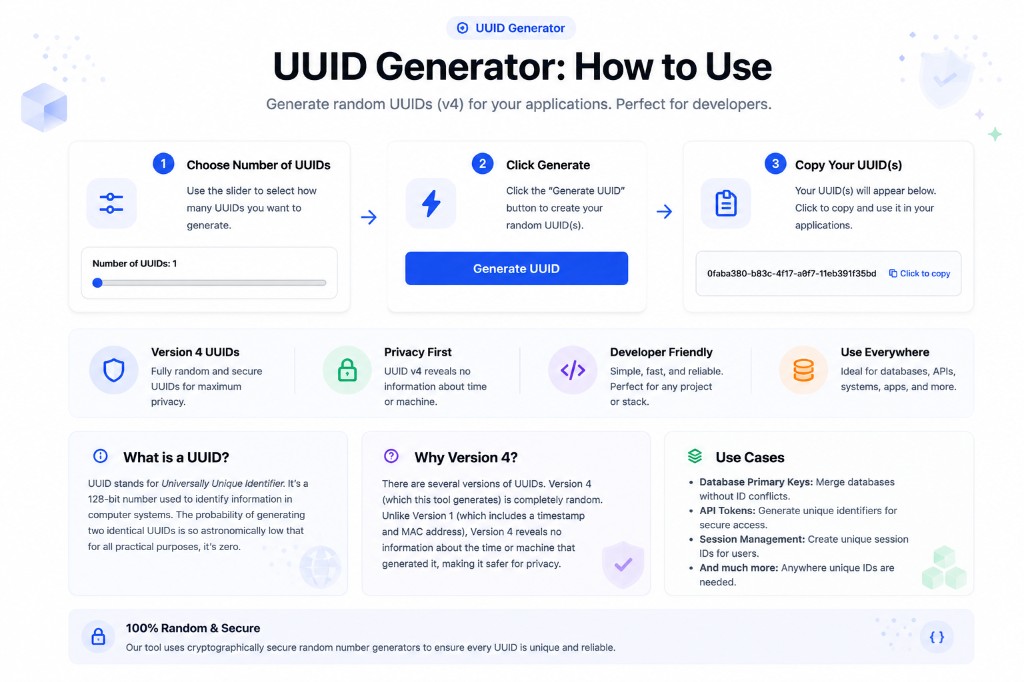
The UUID Generator is the unique identifier generator to reach for here - it produces version 4 UUIDs, fully random 128-bit identifiers with no timestamp or machine information embedded, exactly what you want for a database primary key or a session ID during prototyping.
The Secret Key Generator does the equivalent job for API keys and tokens you need locally before a real secrets manager is set up. Both run entirely in your browser, so nothing you generate gets logged anywhere else.
When You're Wrangling Data Formats
Every project eventually hits a moment where the data isn't in the shape you need it, and hand-editing it is slower and more error-prone than it looks.
Free JSON tools cover most of this. The JSON Validator catches the syntax errors that break a build silently - a trailing comma or a missing bracket that reads fine to a person and fails a parser completely.
The YAML to JSON converter handles the format mismatch that shows up constantly between config files and application code, since YAML is common in CI pipelines while most JavaScript tooling expects JSON.
When You're Debugging Something Small
Some debugging sessions don't need a debugger - they need to know what a specific byte sequence or number actually represents, and a general-purpose tool is overkill for that.
The Hex Translator converts between hexadecimal and plain text, which comes up more often than expected when reading raw data dumps, color codes, or low-level protocol output.
The Binary Translator does the same for binary, useful for the rare but real moment you're staring at a sequence of 1s and 0s and need to know what it says.
When You're Getting Ready to Ship in 2026
This is where the list changes most from a version of itself written even two years ago. Shipping used to mean checking your metadata and your robots.txt. It now means one more thing.
AI crawler readiness is now part of shipping
The LLMS.txt Generator crawls your site and produces an llms.txt file - a structured description of your content for AI systems to reference, distinct from what robots.txt does for search engines. It's early, but it's the direction things are heading in 2026.
The checks that haven't changed
The Robots.txt Generator still controls what search crawlers can access. The Meta Tag Generator builds title and description tags at the length actually displayed, and the Open Graph Checker verifies your share preview manually, since it doesn't fetch your live page automatically.
How the Four Moments String Together
Take a small, realistic example: adding a new feature that needs test records, a config change, a color pulled from a design handoff, and a public-facing page.
Prototyping first - a batch of UUIDs from the UUID Generator stands in for real database IDs while you build. Data formats next - the updated config gets a pass through the JSON Validator before it's committed, catching a missing comma before it breaks the deploy.
Debugging comes up mid-build - the designer's hex color doesn't match what's rendering, so the Hex Translator confirms the actual RGB value behind it. Shipping is last - metadata, robots.txt, and the llms.txt file all get checked once the page is ready, not after something already went out broken.
The Full Toolkit at a Glance
Ten tools, grouped by the moment you'd actually reach for each one.
| Moment | Tool | What it solves |
|---|---|---|
| Prototyping | UUID Generator | Random identifiers with no embedded metadata |
| Prototyping | Secret Key Generator | Local API keys before a secrets manager exists |
| Data formats | JSON Validator | Silent syntax errors breaking a build |
| Data formats | YAML to JSON | Config-to-code format mismatches |
| Debugging | Hex Translator | Reading raw hex data or color codes |
| Debugging | Binary Translator | Decoding binary sequences |
| Shipping | LLMS.txt Generator | No machine-readable description for AI systems |
| Shipping | Robots.txt Generator | Search crawler access rules |
| Shipping | Meta Tag Generator | Tags that get truncated in search results |
| Shipping | Open Graph Checker | Missing or wrong share preview image |
Common Mistakes Creators and Developers Make With Free Tools
The same handful of habits show up across most fast-moving projects.
- Reaching for a full backend just to generate placeholder IDs during early prototyping
- Hand-editing a config file instead of running it through a validator or converter first
- Skipping the metadata and share-preview check because the page "looks done" without verifying how it renders
- Treating llms.txt as optional busywork instead of the newest part of a ship-ready checklist
- Debugging a data format by eye instead of running it through a purpose-built translator
Expert Tips for Building a 2026 Toolkit
Bookmark the four workflow moments, not the individual tools. You'll remember "what do I use when I'm shipping" far more reliably than a list of ten names.
Revisit your llms.txt file periodically as your content changes, the same way you'd revisit robots.txt after a major site restructure. A stale description is worse than none, because it actively misleads whatever reads it.
Frequently Asked Questions
What's the difference between a UUID and a regular random number?
A UUID (Universally Unique Identifier) is a 128-bit value structured so that the probability of two independently generated ones colliding is astronomically low, which is why it's the standard choice for database keys and session IDs rather than an arbitrary random number.
Do I actually need an llms.txt file in 2026?
It's not yet a universal requirement the way robots.txt is, but adopting it now means your site is already positioned to be represented accurately as more tools and AI assistants start reading it by default.
Why would I need to convert YAML to JSON instead of just writing JSON?
Plenty of tools and CI pipelines are YAML-native by convention - Kubernetes manifests, GitHub Actions workflows - while most JavaScript and API tooling expects JSON, so the conversion step shows up constantly at that boundary.
Is a locally generated secret key as secure as one from a proper secrets manager?
For genuine randomness, yes, provided the generator uses a cryptographically secure random source. What a secrets manager adds is storage, rotation, and access control - things a generator was never meant to handle.
How do I know if my robots.txt is blocking something it shouldn't?
Read through your disallow rules for a path you actually want indexed, or use a robots.txt generator to build the file from scratch rather than hand-editing one that's grown unclear over time.
Conclusion
None of these free tools for creators and developers replace understanding what you're building, and none of them cost anything. They remove the small, repeated friction at four specific moments: prototyping, data formats, debugging, and shipping.
Start with whichever moment you're in right now. The llms.txt step is the one most 2026 toolkits are still missing - that's the easiest place to get ahead.
Sources & further reading
Tools mentioned in this guide
Ready to try it yourself?
Use our free tool to get started right away. No signup required!
Try the Tool Now →Related reading
- Future Trends: AI and Free Web Utilities in Content Creation
AI generates drafts, images, and outlines fast. Free content creation tools handle what it doesn't: formats, metadata, structured data, and AI-crawler readiness.
- JSON Formatter: How to Format, Validate & Beautify JSON Online
A complete guide to using a JSON formatter — how to beautify minified JSON, validate syntax, understand common errors, and work with JSON in APIs and web development.
- How to Use BetterUtils Tools for Efficient Content Creation
Efficient content creation with free BetterUtils tools: draft, tighten, visualize, format, and verify one piece of content before it ever goes live.
- How to Choose the Right Free Online Utility for Your Business Needs
Not every free online utility is worth trusting with your business. Five questions to ask before you adopt one - data, cost, lock-in, and longevity.